Status: This specification is outdatet and has been archived
Version: 0.2 (
This document extends the Overlays Capture Architecture (OCA) by adding a technical specification for visualising verifiable credentials (VCs) through a mobile wallet. The aim is to define a set of requirements and clarify the use and support of OCA functionalities that go beyond the core OCA specifications 1.0.1 by focusing on the context of VC visualization.
OCA bundle MAY be represented by a file containing an JSON object.
The JSON object MUST contain the following properties:
capture_bases Array containing one or more Capture Base objects.
overlays Array containing one or more Overlay objects.OCA bundle as a JSON file example
{
    "capture_bases":[
        {
            "type":"spec/capture_base/1.0",
            "digest":"IAKfY-vUaevuIqDQreQyd6YYpALJIH1IZMPjpX4tOOuQ",
            "attributes":{
                "firstname":"Text",
                "lastname":"Text",
                "pets":"Array[refs:IKLvtGx1NU0007DUTTmI_6Zw-hnGRFicZ5R4vAxg4j2j]"
            }
        },
        {
            "type":"spec/capture_base/1.0",
            "digest":"IKLvtGx1NU0007DUTTmI_6Zw-hnGRFicZ5R4vAxg4j2j",
            "attributes":{
                "race":"Text",
                "name":"Text"
            }
        }
    ],
    "overlays":[
        {
            "type":"spec/overlays/meta/1.0",
            "capture_base":"IAKfY-vUaevuIqDQreQyd6YYpALJIH1IZMPjpX4tOOuQ",
            "language":"en",
            "name":"Example VC"
        }
    ]
}
The following Overlays are defined additionally to the ones defined in the core OCA specification to be able to visualization verifiable credentials.
The core OCA specification captures an abstracted data structure in their Capture Base. A client with an complete understanding of the semantic could then implicitely link the Capture Base to their data source. Currently this is not the case with verifiable credentials and also why an additional overlay is necessary to link the Capture Base to the actual VC data source.
This specification adds an overlay which defines a mapping between the Capture Base attributes and their data sources with the following attributes:
format String defining the format for which the data source mapping can be used to. Formats for verifiable credentials are defined in OpenID4VCI credential format profiles.attribute_sources JSON object that contains a map of key-value pairs (String:String) which defines the Capture Base attributes and a JSONPath (RFC9535) to the data source.And in the context of OCA Bundle, it adds the following constraints:
extend/overlays/data_source/1.0 in the type attribute.Example of the Data Source Mapping Overlay
{
    "type":"extend/overlays/data_source/1.0",
    "capture_base":"IMFQWZ_xszfSOugAuYHmlhmQm3EUgJ_uk0S9ExISjqbc",
    "format":"vc+sd-jwt",
    "attribute_sources":{
        "firstname":"$.firstname",
        "lastname":"$.lastname"
    }
}
JSONPath allows the use of Regular Expressions and the use of function extensions. Both introduce important security risks, which implementors should mitigate. This specification only uses the following parts of JSONPath:
The Data Source Mapping Overlay MUST be applied to SD-JWT VCs after their claims are disclosed, and the claims MUST be seen as hierarchical siblings to their respective _sd claim.
The core OCA specification does not include a way to add visualization metadata. The Hyperledger Aries project has addressed this gap by proposing a Branding Overlay which mimics the options of visualizing data element about the branding of a given verifiable credential.
This specification adds additional attributes to the Branding Overlay to further enhance the visualization of Verifiable Credentials:
language attribute from the core OCA specification.theme attribute.primary_field attribute which define a primary field with templating support (see branding overlay templating).secondary_field attribute which define a secondary field with templating support (see branding overlay templating).And in the context of OCA Bundle, it adds the following constraints:
aries/overlays/branding/1.1 in the type attribute.Example of the Branding Overlay
{
    "type":"aries/overlays/branding/1.1",
    "capture_base":"IMFQWZ_xszfSOugAuYHmlhmQm3EUgJ_uk0S9ExISjqbc",
    "language":"en",
    "theme":"light",
    "logo":"data:image/png;base64,iVBORw0KGgoAAAANSUhEUgAAAAUAAAAFCAYAAACNbyblAAAAHElEQVQI12P4//8/w38GIAXDIBKE0DHxgljNBAAO9TXL0Y4OHwAAAABJRU5ErkJggg==",
    "background_image":"data:image/png;base64,iVBORw0KGgoAAAANSUhEUgAAAAUAAAAFCAYAAACNbyblAAAAHElEQVQI12P4//8/w38GIAXDIBKE0DHxgljNBAAO9TXL0Y4OHwAAAABJRU5ErkJggg==",
    "background_image_slice":"",
    "primary_background_color":"#003366",
    "secondary_background_color":"#003366",
    "primary_field":"Fullname:  ",
    "secondary_field":""
}
[!NOTE] It is up to the Wallet implementors to interpret the Branding Overlay attributes they need to implement their design und style guidelines.
primary_field and secondary_field support the following templating:
Example of a templating value
Input:
- firstname: John
- lastname: Smith

template:
- "Fullname:  "

result:
- "Fullname: John Smith"
The Cluster Ordering Overlay adds the possibility to enable the grouping and ordering of attributes defined in the OCA Capture Base. It allows VC Issuers to group more relevant attributes first and order technical based information like identifiers at the end.
type attribute’s value MUST be extend/overlays/cluster_ordering/1.0In addition to the capture_base, type and language attributes (see Common attributes), the Cluster Ordering Overlay MUST include the following attribute:
cluster_order
JSON object that contains a map of key-value pairs (String:Int) which defines the identifiers of the different clusters and their order.
attribute_cluster_order
JSON object that contains JSON objects with a key labeled after a cluster identifier. Each cluster JSON object contains a map of key-value pairs (String:Int) which defines the order of the attributes within the cluster.
and MAY include
cluster_labels
JSON object that contains a map of key-value pairs (String:String) which defines the language in which the attributes of the cluster identifiers are displayed. The label of a cluster without a defined cluster-identifier-label mapping is not visually rendered.Attributes not declared in the Cluster Ordering Overlay SHOULD be visually displayed after the declared clusters and MUST not be hidden from the user.
[!NOTE] It is up to the Wallet implementers to define the order and cluster for non declared attributes.
Cluster Odering Example
Dataset
{
    "id":"123456",
    "name":"Helvetia",
    "birthdate":"2000-01-01",
    "photo":"data:image/png;base64,..."
}
OCA bundle
{
    "capture_bases":[
        {
            "type":"spec/capture_base/1.0",
            "digest":"IJJU-BJDRi-5T3oTTXhfa_-v5CCGWYG2x9oY_k8-k5Fu",
            "attributes":{
                "id":"Text",
                "name":"Text",
                "birthdate":"DateTime",
                "photo":"Text"
            }
        }
    ],
    "overlays":[
        {
            "capture_base":"IJJU-BJDRi-5T3oTTXhfa_-v5CCGWYG2x9oY_k8-k5Fu",
            "type":"extend/overlays/cluster_ordering/1.0",
            "language":"de",
            "cluster_order":{
                "main":1,
                "additional":2
            },
            "cluster_labels":{
                "main":"Inhalt",
                "additional":"Ergänzungen"
            },
            "attribute_cluster_order":{
                "main":{
                    "name":2,
                    "photo":1,
                    "birthdate":3
                },
                "additional":{
                    "id":1
                }
            }
        }
    ]
}
In the core OCA specification, attributes in the Capture Base are defined through a data type. Those data types are not only used to understand the type of an attribute value but also to provide a specific way to interpret data in the Overlays.
Special types, such as data URLs, need to have a standardised representation so that they can be interpreted the same way by everyone.
The DateTime type is represented with the following constraints:
DateTime in the Capture Base.YYYY-MM-DDTHH:mm:ssZ MUST be assumed.Example OCA bundle with a DateTime attribute
{
    "capture_bases":[
        {
            "type":"spec/capture_base/1.0",
            "digest":"ICE4Oj4VNLZuYGv7Qm-3Z6F-ojQPMp_ke8LQdy38BdvH",
            "attributes":{
                "date":"DateTime"
            }
        }
    ],
    "overlays":[
        {
            "capture_base":"ICE4Oj4VNLZuYGv7Qm-3Z6F-ojQPMp_ke8LQdy38BdvH",
            "type":"spec/overlays/format/1.0",
            "attribute_formats":{
                "date":"YYYY-MM-DDTHH:mm:ssZ"
            }
        },
        {
            "capture_base":"ICE4Oj4VNLZuYGv7Qm-3Z6F-ojQPMp_ke8LQdy38BdvH",
            "type":"spec/overlays/standard/1.0",
            "attr_standards":{
                "date":"urn:iso:std:iso:8601"
            }
        }
    ]
}
Data URL is a way to represent media like image in a compact form to be embedded into other formats. Data URLs are defined by the RFC2397.
Data URLs are represented with the following constraints:
Text in the Capture BaseExample OCA bundle with an image Data URL
{
    "capture_bases":[
        {
            "type":"spec/capture_base/1.0",
            "digest":"IFM8RfatBApjAWtUuoPdHBw7u-poW49aGCMSgoK1pwu5",
            "attributes":{
                "picture":"Text"
            }
        }
    ],
    "overlays":[
        {
            "capture_base":"IFM8RfatBApjAWtUuoPdHBw7u-poW49aGCMSgoK1pwu5",
            "type":"spec/overlays/standard/1.0",
            "attr_standards":{
                "picture":"urn:ietf:rfc:2397"
            }
        }
    ]
}
For the OCA to be usable, it needs to be resolvable by the Wallet and referenced inside the VC.
Additional VC formats MAY be specified and used as long as the Wallet is able to resolve the OCA bundle.
When an Issuer desires to specify OCA rendering instructions for a Verifiable Credential in the vc+sd-jwt format, they MUST add a render property to the type metadata, that uses the data model described below. This specification extends the SD-JWT VC Render Metadata with a new “oca” method.
The oca rendering method is intended for use in applications that support OCA rendering. The object MUST contain the following properties:
uri A URI which is either a URL that points to an OCA bundle file with an associated application/json media type or a Data URL.uri#integrity The value MUST be set in case the uri is a URL. If uri is a Data URL, the value MAY be set. The value MUST be an “integrity metadata” string as defined in Section 3 of W3C.SRI. If the uri is a Data URL, the “integrity metadata” string MUST be about the whole Data URL. A Consumer of the respective documents MUST verify the integrity of the retrieved document as defined in Section 3.3.5 of W3C.SRI.Example SD-JWT VC Rendering Method
{
    "rendering":{
        "oca":{
            "uri":"https://example.com/oca/oca-bundle.json",
            "uri#integrity":"sha256-9cLlJNXN-TsMk-PmKjZ5t0WRL5ca_xGgX3c1VLmXfh-WRL5"
        }
    }
}
In a similar way, if an Issuer desires to specify OCA rendering instructions for a W3C Verifiable Credential, they MUST add a renderMethod property that uses the data model described below.
renderMethod
JSON array containing URIs to metadata that help the visualisation of the W3C VC
type
A string which represent the type of rendering. MUST be OverlaysCaptureBundleV1id
A URL that dereferences to an OCA bundle file with an associated application/json media type or a Data URL.digestSRI
The value MUST be an “integrity metadata” string as defined in Section 3 of W3C.SRI. A Consumer of the respective documents MUST verify the integrity of the retrieved document as defined in Section 3.3.5 of W3C.SRI.Example W3C VCDM 2.0 RenderMethod
{
    "renderMethod":[
        {
            "id":"https://example.com/oca/oca-bundle.json",
            "type":"OverlaysCaptureBundleV1",
            "digestSRI":"sha256-9cLlJNXN-TsMk-PmKjZ5t0WRL5ca_xGgX3c1VLmXfh-WRL5"
        }
    ]
}
The following example presents how nested object MUST be presented in the core OCA specification.
The extension of the Capture Base definition in chapter Capture Base Extension allows for multiple Capture Base in one file and gives the capability to define every aspect of a verifiable credential.
As per OCA core specification, Capture Base can be referenced by using the refs: prefix followed by the CESR digest of the additional Capture Base.
The following example includes a nested object pets which gives the possibility to define visual properties of array items.
Dataset
{
    "firstname":"John",
    "lastname":"Smith",
    "address":{
        "street":"Bundesplatz",
        "city":"Bern",
        "country":"Switzerland"
    },
    "pets":[
        {
            "race":"Dog",
            "name":"Rex"
        },
        {
            "race":"Cat",
            "name":"Mr. Pineapple"
        }
    ]
}
OCA bundle
{
    "capture_bases":[
        {
           "type":"spec/capture_base/1.0",
            "digest":"IDif6Jd863C_YYjp1cHFCTAUr1_TzZSS1l-pv21Q56qs",
            "attributes":{
                "firstname":"Text",
                "lastname":"Text",
                "address_street":"Text",
                "address_city":"Text",
                "address_country":"Text",
                "pets":"Array[refs:IKLvtGx1NU0007DUTTmI_6Zw-hnGRFicZ5R4vAxg4j2j]"
            }
        },
        {
           "type":"spec/capture_base/1.0",
            "digest":"IKLvtGx1NU0007DUTTmI_6Zw-hnGRFicZ5R4vAxg4j2j",
            "attributes":{
                "name":"Text",
                "race":"Text"
            }
        }
    ],
    "overlays":[
        {
            "type":"extend/overlays/data_source/1.0",
            "capture_base":"IDif6Jd863C_YYjp1cHFCTAUr1_TzZSS1l-pv21Q56qs",
            "format":"vc+sd-jwt",
            "attribute_sources":{
                "firstname":"$.firstname",
                "lastname":"$.lastname",
                "address_street":"$.address.street",
                "address_city":"$.address.city",
                "address_country":"$.address.country",
                "pets":"$.pets"
            }
        },
        {
            "type":"extend/overlays/data_source/1.0",
            "capture_base":"IKLvtGx1NU0007DUTTmI_6Zw-hnGRFicZ5R4vAxg4j2j",
            "format":"vc+sd-jwt",
            "attribute_sources":{
                "name":"$.pets[*].name",
                "race":"$.pets[*].race"
            }
        },
        {
            "type":"aries/overlays/branding/1.1",
            "capture_base":"IDif6Jd863C_YYjp1cHFCTAUr1_TzZSS1l-pv21Q56qs",
            "language":"en",
            "theme":"light",
            "logo":"data:image/jpeg;base64,iVBORw0KGgoAAAANSUhEUgAAABoAAAAaCAYAAACpSkzOAAAACXBIWXMAAAsTAAALEwEAmpwYAAAAAXNSR0IArs4c6QAAAARnQU1BAACxjwv8YQUAAAGbSURBVHgBvVaBUcMwDFQ4BjAbmA06QjYgGzQbkA1aJmg3yHWCwgSGCVImcJkg3UDYjVMUI6VxW/g7X+701kuWZTsAI0DEwo0GO9RuKMKpYGvdsH4uXALnqPE3DOFrhs8hFc5pizxyN2YCZyS9+5FYuWCfgYzZJYFUon2UuwMZ+xG7xO3gXKBQ95xwGyHIuxuvbhwY/oPo+WbSQAyKtDCGVtWM3aMifmXENcGnb3uqp6Q2NZHgEpnWDQl5rsJwxgS9NTBZ98ghEdgdcA6t3yOpJQtGSIUVekHN+DwJWsfSWSGLmsm2xWHti2iOEbQav6I3IYtPIqDdZwvDc3K0OY5W5EvQ2vUb2jJZaBLIogxL5pUcf9LC7gzZQPigJXFe4HmsyPw1sRvk9jKsjj4Fc5yOOfFTyDcLcEGfMR0VpACnlUvC4j+C9FjFulkURLuPhdvgIcuy08UbPxMabofBjRMHOsAfIS6db21fOgXXYe/K9kgNgxWFmr7A9dhMmoXD001h8OcvSPpLWkIKsLu3THC2yBxG7B48S5IoJb1vHubbPPxs2qsAAAAASUVORK5CYII=",
            "primary_background_color":"#2C75E3",
            "primary_field":"  from "
        },
        {
            "type":"spec/overlays/meta/1.0",
            "capture_base":"IDif6Jd863C_YYjp1cHFCTAUr1_TzZSS1l-pv21Q56qs",
            "language":"en",
            "name":"Pet Permit"
        },
        {
            "capture_base":"IDif6Jd863C_YYjp1cHFCTAUr1_TzZSS1l-pv21Q56qs",
            "type":"extend/overlays/cluster_ordering/1.0",
            "language":"en",
            "cluster_order":{
                "pets":1,
                "owner":2
            },
            "cluster_labels":{
                "pets":"Pets",
                "owner":"Owner information"
            },
            "attribute_cluster_order":{
                "pets":{
                    "pets":1
                },
                "owner":{
                    "firstname":1,
                    "lastname":2,
                    "address_street":3,
                    "address_city":4,
                    "address_country":5
                }
            }
        },
        {
            "capture_base":"IKLvtGx1NU0007DUTTmI_6Zw-hnGRFicZ5R4vAxg4j2j",
            "type":"spec/overlays/label/1.0",
            "language":"en",
            "attribute_labels":{
                "race":"Race",
                "name":"Name"
            }
        },
        {
            "capture_base":"IDif6Jd863C_YYjp1cHFCTAUr1_TzZSS1l-pv21Q56qs",
            "type":"spec/overlays/label/1.0",
            "language":"en",
            "attribute_labels":{
                "firstname":"Firstname",
                "lastname":"Lastname",
                "address_street":"Street",
                "address_city":"City",
                "address_country":"Country"
            }
        },
        {
            "capture_base":"IKLvtGx1NU0007DUTTmI_6Zw-hnGRFicZ5R4vAxg4j2j",
            "type":"extend/overlays/cluster_ordering/1.0",
            "language":"en",
            "cluster_order":{
                "default":1
            },
            "cluster_labels":{},
            "attribute_cluster_order":{
                "default":{
                    "race":1,
                    "name":2
                }
            }
        }
    ]
}
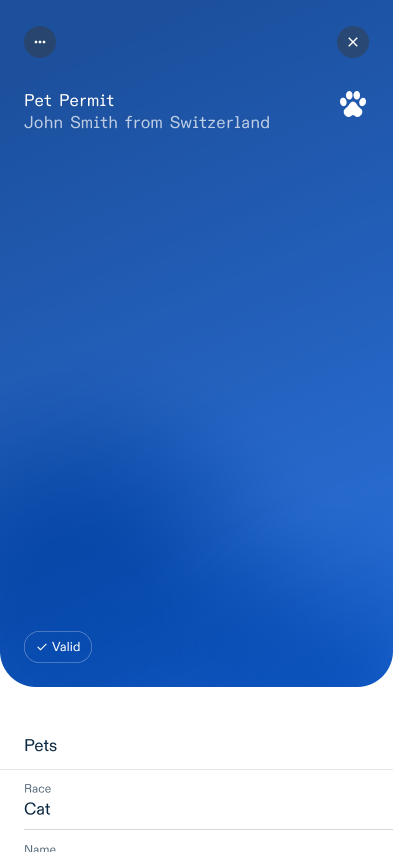
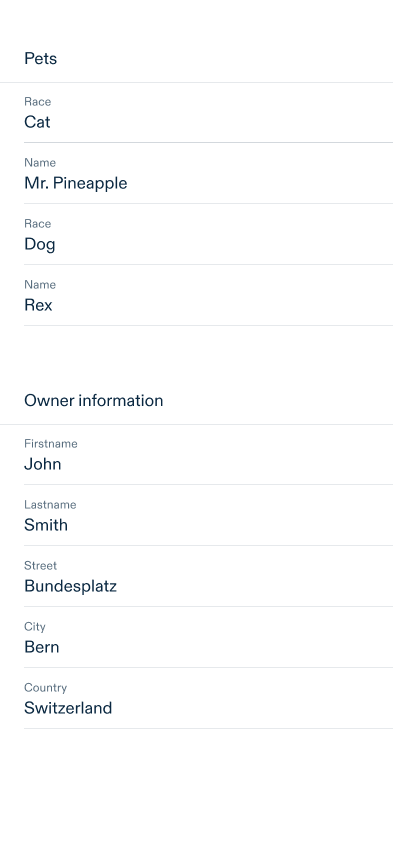
This chapter defines a rendering algorithm and an example with the data from chapter Handling nested objects.
The general rendering process follows this steps:
The rendering process depends on which view is rendered. Here are two rendering example for a VC preview and detail view.
VC Preview rendering
VC Detail rendering
The OCA specification defines that the OCA file name and the digest inside the OCA bundle have to use the CESR encoding.
CESR is an encoding format for text and binary data that has the unique property of text-binary concatenation composability (for context: A popular encoding format for binary is Base64).
For those interested, the composable concatenation is described in detail in the CESR Specification. However, it is not necessary to understand how the encoding of digests works to proceed with this document.
CESR uses the Base64 transformation in it’s process to encode binaries but the composability property only works when no Base64 padding is used (when you have padding in Base64 you can not add two binaries together!).
To avoid Base64 padding, the smallest common denominator between the number of bits in a byte and the information stored in a Base64 character (6 bits of information in a byte) has to be used.
The smallest common denominator of 8 and 6 is 24, so the smallest CESR unit is 24 bits. The essential information here is that the number of bits used for binary text encoding with CESR has to be divisible by 8 and 6.
Each CESR encoding also includes metadata over the content of the data. In the digest case, it will start with a letter which defines which digest algorithm was used.
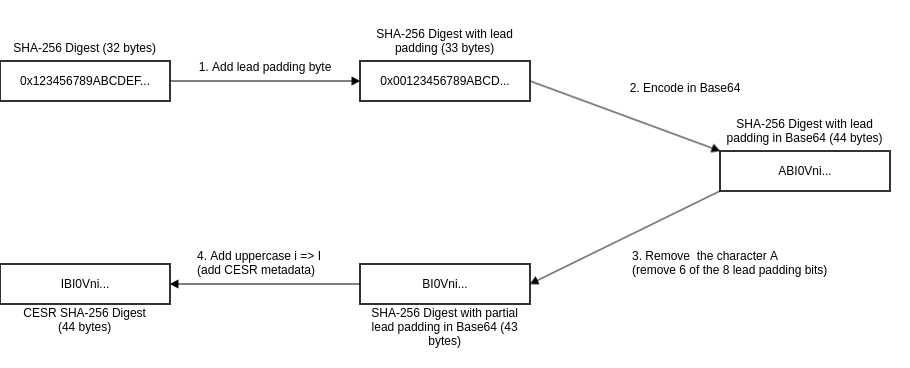
A SHA-256 digest has a size of 256 bits. It is divisible by 8 but not by 6. The next possible value would be 264 bits which are 33 bytes.
Hence, the CESR encoding will need 33 bytes to work which means that the SHA-256 hash needs a padding byte.
The CESR encoding flow works as described next and depicted in Fig. 1.:
A CESR SHA-256 JavaScript implementation can be found in the appendix.
 {
     "type":"spec/capture_base/1.0",
     "digest":"############################################",
     "attributes":{
         "name":"Text"
     }
 }
Compute the CESR encoded SHA-256 digest with the code given above and put the value into the digest property. The output should match the following result.
 {
     "type":"spec/capture_base/1.0",
     "digest":"IBYzBHEN4moeVO_aQtW_DbDoQd-30BgeJQMyfsRzoUFI",
     "attributes":{
         "name":"Text"
     }
 }
Add the Capture Base and Overlays to the JSON and fill the reference to the Capture Base in each Overlay.
 {
     "capture_bases":[
         {
             "type":"spec/capture_base/1.0",
             "digest":"IBYzBHEN4moeVO_aQtW_DbDoQd-30BgeJQMyfsRzoUFI",
             "attributes":{
                 "name":"Text"
             }
         }
     ],
     "overlays":[
         {
             "capture_base":"IBYzBHEN4moeVO_aQtW_DbDoQd-30BgeJQMyfsRzoUFI",
             "type":"spec/overlays/label/1.0",
             "language":"fr-CH",
             "attribute_labels":{
                 "name":"Nom"
             }
         }
     ]
 }
After those steps the following content is generated:
{
    "capture_bases":[
        {
            "type":"spec/capture_base/1.0",
            "digest":"IBYzBHEN4moeVO_aQtW_DbDoQd-30BgeJQMyfsRzoUFI",
            "attributes":{
                "name":"Text"
            }
        }
    ],
    "overlays":[
        {
            "capture_base":"IBYzBHEN4moeVO_aQtW_DbDoQd-30BgeJQMyfsRzoUFI",
            "type":"spec/overlays/label/1.0",
            "language":"fr-CH",
            "attribute_labels":{
                "name":"Nom"
            }
        }
    ]
}
This document proposes an implementation to encode SHA-256 digest in the CESR format.
[!WARNING] The canonicalizition step is necessary, as the order of JSON properties can not be guaranteed otherwise. JCS (RFC8785) sets a specification to canonicalize JSON.
// Generate CESR encoded SHA-256 digest
// Code only works for digest with fixed length!
// see original function _infil() https://github.com/WebOfTrust/cesr-ts/tree/development/src/matter.ts#L387

const { Buffer } = require('node:buffer');
const crypto = require('node:crypto');
const canonicalize = require('canonicalize');

const data ={"data": "value"};
const canonicalizedData = canonicalize(data)
const raw = crypto.createHash('sha256').update(canonicalizedData).digest();
const padSize = (3 - (raw.length % 3)) % 3; // compute necessary lead size bytes. A SHA-256 digest's length will always be 32 which means that the padSize will be 1.

const code = "I" // SHA2_256 digest CESR metadata
const codeSize = code.length; // SHA2_256 digest CESR metadata

// prepad the SHA-256 digest
const bytes = new Uint8Array(padSize + raw.length);
for (let i = 0; i < padSize; i++) {
    bytes[i] = 0;
}
for (let i = 0; i < raw.length; i++) {
    const odx = i + padSize;
    bytes[odx] = raw[i];
}

// Transform padded SHA-256 bytes to Base64, Remove character 'A' (6 out of the 8 padding bits) and add CESR metadata code in front
console.log(
    code +
    Buffer.from(bytes)
        .toString('base64url')
        .slice(codeSize % 4)
);
Aries Branding Overlay
https://github.com/hyperledger/aries-rfcs/blob/main/features/0755-oca-for-aries/README.md#aries-specific-branding-overlay
CESR
https://weboftrust.github.io/ietf-cesr/draft-ssmith-cesr.html
ISO8601
https://www.iso.org/iso-8601-date-and-time-format.html
OpenID4VCI credential format profiles
https://openid.net/specs/openid-4-verifiable-credential-issuance-1_0-ID1.html
Overlays Capture Architecture
https://oca.colossi.network/specification/
RFC2397
https://datatracker.ietf.org/doc/html/rfc2397
RFC8785
https://datatracker.ietf.org/doc/html/rfc8785
RFC9535
https://www.rfc-editor.org/rfc/rfc9535.html
SD-JWT VC
https://datatracker.ietf.org/doc/draft-ietf-oauth-sd-jwt-vc/
W3C.SRI
https://www.w3.org/TR/SRI/
W3C VCDM 2.0
https://www.w3.org/TR/vc-data-model-2.0/