How to integrate the swiyu Generic Issuer
Public Beta
Please be advised that the current system and its operations are provided on a best-effort basis and will continue to evolve over time. The security of the system and its overall maturity remain under development.
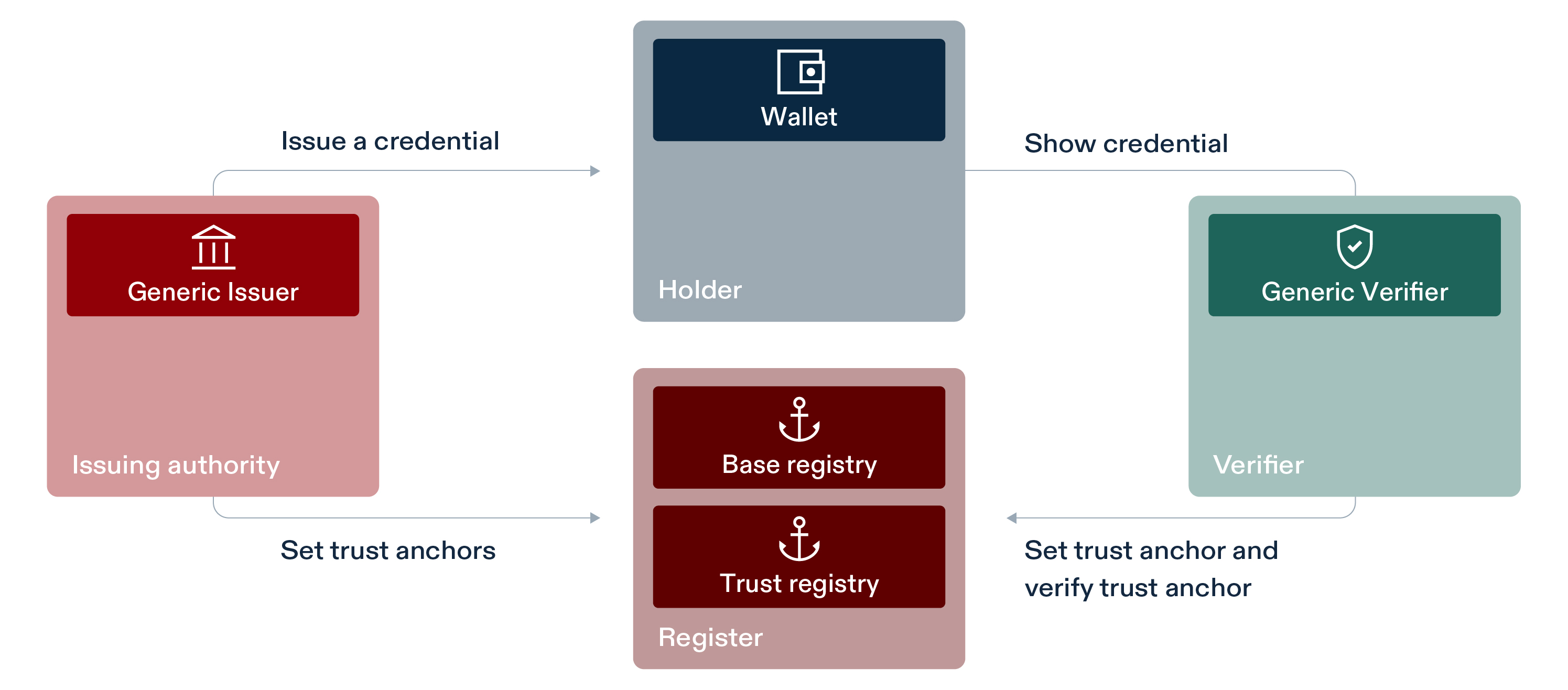
This software, together with the other generic components provided, forms a collection of APIs allowing the issuance and verification of verifiable credentials, as visualized in the image below. Additional documentation can be found in this GitHub repository.
Deployment instructions
⚙️ Please make sure that you did the following steps before starting the deployment:
- Registered yourself on the swiyu Trust Infrastructure portal
- Registered yourself on the API self-service portal
- Generated signing keys e.g. using the
didtoolbox.jar- Generated a DID which is registered on the identifier registry
The required steps are explained more thoroughly in the Base- and Trust Registry Cookbook
Set the environment variables
A sample compose file for an entire setup of both components and a database can be found in sample.compose.yml file. You will need to configure a list of environment variables in the .env file.
| Name | Description | Example | ||||
|---|---|---|---|---|---|---|
EXTERNAL_URL |
An URL which is used to build the correct deeplink (You must provide the /oid4vci and .well-known endpoints at this) -> must use https-protocol and it must be reachable for the wallet otherwise the wallet will refuse tp connect. | |||||
SPRING_APPLICATION_NAME |
Name of your application | |||||
ISSUER_ID |
The DID you created in the onboarding process | did:tdw:QmejrSkusQgeM6FfA23L6NPoLy3N8aaiV6X5Ysvb47WSj8:identifier-reg.trust-infra.swiyu-int.admin.ch:api:v1:did:ff8eb859-6996-4e51-a976-be1ca584c124 | ||||
DID_STATUS_LIST_VERIFICATION_METHOD |
The Verification method, which can be taken from the did log response. The Verification Method must match the selectedSIGNING_KEY! onboarding process | did:tdw:QmejrSkusQgeM6FfA23L6NPoLy3N8aaiV6X5Ysvb47WSj8:identifier-reg.trust-infra.swiyu-int.admin.ch:api:v1:did:ff8eb859-6996-4e51-a976-be1ca584c124#assert-key-01 | ||||
STATUS_LIST_KEY |
EC Private key can be taken from onboarding process you can use any generated key but it must match the DID_STATUS_LIST_VERIFICATION_METHOD |
|||||
SWIYU_PARTNER_ID |
The partner id you created in the swiyu Trust Infrastructure business partner ID | d33fab52-1657-4240-9189-97c33b949739 | SWIYU_STATUS_REGISTRY_CUSTOMER_KEY |
Customer key from Status Registry API Key | ||
SWIYU_STATUS_REGISTRY_CUSTOMER_SECRET |
Customer Secret from Status Registry API Secret | |||||
SWIYU_STATUS_REGISTRY_ACCESS_TOKEN |
Access token from Status Registry API ACCESS Token | |||||
SWIYU_STATUS_REGISTRY_BOOTSTRAP_REFRESH_TOKEN |
Refresh token from Status Registry API Refresh Token | |||||
SWIYU_STATUS_REGISTRY_TOKEN_URL |
OAuth Refresh URL | https://keymanager-prd.api.admin.ch/keycloak/realms/APIGW/protocol/openid-connect | ||||
SWIYU_STATUS_REGISTRPY_API_URL |
Status Registry Base URL | https://status-reg-api.trust-infra.swiyu-int.admin.ch | ||||
DID_SDJWT_VERIFICATION_METHOD |
Verification method, which can be taken from the did log response. The Verification Method must match the selected SIGNING_KEY! | did:tdw:QmejrSkusQgeM6FfA23L6NPoLy3N8aaiV6X5Ysvb47WSj8:identifier-reg.trust-infra.swiyu-int.admin.ch:api:v1:did:ff8eb859-6996-4e51-a976-be1ca584c124#assert-key-02 | ||||
SDJWT_KEY |
EC Private key can be taken from onboarding process you can use any generated key but it must match the DID_SDJWT_VERIFICATION_METHOD |
Please note that the default configuration of the issuer service is geared towards easily gaining experience with the verification process and is NOT intended for production use. verification process, not intended for production use. For additional information on how to securely deploy the swiyu-issuer check out the Deployment considerations in the readme.
The provided images can be used with ARM based processors, but they are not optimized.
The latest image is available here:
Once the service is deployed you can create your first verifiable credential (vc).
Creating a verifiable credential
💡 For a detailed understanding of the issuance process please consult the Issuance Process or the documentation.
Below you find an example for with the interactions needed with the issuer to issue a verifiable credential. The following request can be performed by using the swagger endpoint for the sample environment.
Request
⚠️ The example below is only a bare minimum working example.
1. Create status list entry
First, you need to create a status list
curl -X 'POST' \
  'http://localhost:8080/management/api/status-list' \
  -H 'accept: */*' \
  -H 'Content-Type: application/json' \
  -d '{
  "type": "string",
  "maxLength": 100000,
  "config": {
    "bits": 2
  }
}'
With the response:
{
    "id": "36f98a79-4be7-4978-bc46-071d8e40343a",
    "statusRegistryUrl": "your new $STATUS_REGISTRY_URL",
    "type": "TOKEN_STATUS_LIST",
    "maxListEntries": 100000,
    "remainingListEntries": 100000,
    "version": "1.0",
    "config": {
        "bits": 2
    }
}
⚠️ It’s recommended to store the value of
"statusRegistryUrl"response field, as it is needed in later steps and will be referenced as$STATUS_REGISTRY_URL.
More details about the status list creation can be found here.
2. Create an initial vc offer
curl -X 'POST' \
  'http://localhost:8080/management/api/credentials' \
  -H 'accept: application/json' \
  -H 'Content-Type: application/json' \
  -d '{
  "metadata_credential_supported_id": [
    "university_example_sd_jwt"
  ],
  "credential_subject_data": {
    "type": "Bachelor of Science",
    "name":"Data Science",
    "average_grade":"5.33"
  },
  "offer_validity_seconds": 86400,
  "credential_valid_until": "2030-01-01T19:23:24Z",
  "credential_valid_from": "2025-01-01T18:23:24Z",
  "status_lists": [
    "$STATUS_REGISTRY_URL"
  ]
}'
With the response:
The request above should produce the following response (the placeholders ${CREDENTIAL_ID} and
${SWIYU_OFFER_DEEPLINK} denote concrete values):
{
    "management_id": "${CREDENTIAL_ID}",
    "offer_deeplink": "${SWIYU_OFFER_DEEPLINK}"
}
Update status
You can set the following status: CANCELLED, READY, ISSUED, SUSPENDED, REVOKED. For additional details about
the status check
the documentation.
Using the Issuer Management service the status can be updated
CREDENTIAL_ID has been set accordingly (see above).
curl -X 'PATCH' http://localhost:8080/management/api/credentials/${CREDENTIAL_ID}/status?credentialStatus=CANCELLED
The response then looks like:
{
    "id": "$CREDENTIAL_ID",
    "status": "CANCELLED"
}
Development instructions
Instructions for the development of the swiyu Generic Issuer can be found in the GitHub repository.
Create Images for ARM based processors
In order to optimize the image for ARM based systems, you first have to check out the repository.
Run the following command in the repository to create a local image of the service:
./mvnw install:install-file -Dfile=lib/primusX-java11-2.4.4.jar -DgroupId=com.securosys.primus -DartifactId=jce -Dversion=2.4.4 -Dpackaging=jar spring-boot:build-image
Testing your instance
We provide a test application for running end-to-end tests and a test wallet to validate your instance of the generic components.
Your Feedback?
We would be pleased if you spend about 3 additional minutes and give us feedback on the swiyu Public Beta Trust Infrastructure and your onboarding process! With Public Beta, we want to give ecosystem stakeholders the opportunity to gain initial experience and build their own use cases on the trust infrastructure of the future e-ID. Your feedback will help us to further develop and improve the touchpoints, and we greatly appreciate your support.