Overlays Capture Architecture (OCA) 1.0
Status: draft - parts of the specification are under revision
Last edited: 2026-06-15
Visualisation of Verifiable Credential with OCA 1.0
Introduction
This document extends the Overlays Capture Architecture (OCA) by adding a technical specification for visualising verifiable credentials (VCs) through a mobile wallet. The aim is to define a set of requirements and clarify the use and support of OCA functionalities that go beyond the core OCA specifications 1.0.1 by focusing on the context of VC visualisation.
KEY WORDS for this specification expand on RFC 2119 “Key words for use in RFCs to Indicate Requirement Levels”. They are explained in the general introduction for the specifications. They are to be interpreted as such when, and only when, they appear bold and CAPITALIZED.
OCA Bundle as JSON file
An OCA Bundle SHOULD be represented by a file containing a JSON object.
The JSON object MUST contain the following properties:
capture_basesArray containing one or more Capture Base objects.- There MUST only be one Root Capture Base.
overlaysArray containing zero, one or more Overlay objects.
⚙️ Important:
A Capture Base is called the Root Capture Base, if it isn’t referenced by any other Capture Base.
Example of OCA Bundle as a JSON file
{
    "capture_bases":[
        {
            "type":"spec/capture_base/1.0",
            "digest":"IKFBZ-Frs7B-En_bLHkbzhrD1h45J-H8KK9gOIP36EDr",
            "attributes":{
                "firstname":"Text",
                "lastname":"Text",
                "address":"refs:IAuwaTn6mftTX0kOy4BQQaBYH-1jVVG9_zeEQRCwz-i5"
            }
        },
        {
            "type":"spec/capture_base/1.0",
            "digest":"IAuwaTn6mftTX0kOy4BQQaBYH-1jVVG9_zeEQRCwz-i5",
            "attributes":{
                "street":"Text",
                "city":"Text",
                "country":"Text"
            }
        }
    ],
    "overlays":[
        {
            "type":"spec/overlays/meta/1.0",
            "capture_base":"IKFBZ-Frs7B-En_bLHkbzhrD1h45J-H8KK9gOIP36EDr",
            "language":"en",
            "name":"Example VC"
        }
    ]
}
Additional Overlays
The following Overlays are defined, in addition to those specified in the core OCA specification, to allow visualisation of verifiable credentials.
Data Source Mapping Overlay
The core OCA specification captures an abstracted data structure in their Capture Base. A client with an complete understanding of the semantic could then implicitely link the Capture Base to their data source.
Currently this is not the case with verifiable credentials and also why an additional Overlay is necessary to link the Capture Base to the actual VC data source. This also allows attributes to be structured into clusters (see Clustering of attributes) with a flat data source, or vice versa.
This specification adds an Overlay which defines a mapping between the Capture Base attributes and their data sources with the following attributes:
formatString defining the Format Identifier for which the data source mapping can be used to. Format Identifiers for verifiable credentials are defined in OpenID4VCI Appendix A. Credential Format Profiles.attribute_sourcesJSON object that contains a map of key-value pairs (String:String) which defines the Capture Base attributes and a Claims Path Pointer to the data source.
And in the context of OCA Bundle, it adds the following constraints:
- the Data Source Mapping Overlay MUST use the value
extend/overlays/data_source/2.0in thetypeattribute.
Example of a Data Source Mapping Overlay
data source
{
    "firstname":"John",
    "lastname":"Smith",
    "address":{
        "street":"Bundesplatz",
        "city":"Bern",
        "country":"Switzerland",
    },
    "nationalities": ["Switzerland", "France", "Germany", "Italy"]
}
Data Source Mapping Overlay
{
    "type":"extend/overlays/data_source/2.0",
    "capture_base":"IMFQWZ_xszfSOugAuYHmlhmQm3EUgJ_uk0S9ExISjqbc",
    "format":"dc+sd-jwt",
    "attribute_sources":{
        "firstname":["firstname"],
        "lastname":["lastname"],
        "street":["address", "street"],
        "city":["address", "city"],
        "country":["address", "country"],
        "nationalities":["nationalities", null]
    }
}
SD-JWT VC consideration
The Data Source Mapping Overlay MUST be applied to SD-JWT VCs after their claims are disclosed, and the claims MUST be seen as hierarchical siblings to their respective _sd claim.
Aries Branding Overlay update
The core OCA specification does not include a way to add visualisation metadata. The Hyperledger Aries project has addressed this gap by proposing a Branding Overlay which mimics the options of visualizing data element about the branding of a given verifiable credential.
This specification adds additional attributes to the Branding Overlay to further enhance the visualisation of Verifiable Credentials:
- the Branding Overlay MUST use the
languageattribute from the core OCA specification and is a language-specific object. - the Branding Overlay MAY use an additional
themeattribute. - the Branding Overlay MAY use the
primary_fieldattribute which define a primary field with templating support (see Overlay templating support). - the Branding Overlay MAY use the
secondary_fieldattribute which define a secondary field with templating support (see Overlay templating support).
And in the context of OCA Bundle, it adds the following constraints:
- the Branding Overlay MUST use the value
aries/overlays/branding/1.1in thetypeattribute. - the Branding Overlay MUST only use the embedded form of media in form of data URLs.
- the Branding Overlay SHOULD only be defined for the Root Capture Base.
Example of a Branding Overlay
{
    "type":"aries/overlays/branding/1.1",
    "capture_base":"IMFQWZ_xszfSOugAuYHmlhmQm3EUgJ_uk0S9ExISjqbc",
    "language":"en",
    "theme":"light",
    "logo":"data:image/png;base64,iVBORw0KGgoAAAANSUhEUgAAAAUAAAAFCAYAAACNbyblAAAAHElEQVQI12P4//8/w38GIAXDIBKE0DHxgljNBAAO9TXL0Y4OHwAAAABJRU5ErkJggg==",
    "primary_background_color":"#003366",
    "primary_field":"Fullname: {{firstname}} {{lastname}}",
    "secondary_field":""
}
⚙️ Note:
It is up to the wallet implementers to interpret the Branding Overlay attributes they need to implement their design und style guidelines.
Order Overlay
The Order Overlay adds the possibility to define the order of attributes within the Capture Base. This allows to display relevant attributes first and order technical based information like identifiers at the end.
- The
typeattribute’s value MUST beextend/overlays/order/1.0
In addition to the capture_base and type attributes (see Common attributes), the Order Overlay MUST include the following attribute:
attribute_ordersJSON object that contains a map of key-value pairs (String:Int) which defines the Capture Base attributes and the order of the attribute within the Capture Base.
Any attributes not declared in the Order Overlay SHOULD be ordered after the highest order and MUST not be hidden from the user.
⚙️ Note:
It is up to the wallet implementers to define the order for non declared attributes.
Example of an Order Overlay
data source
{
    "id":"123456",
    "name":"Helvetia",
    "birthdate":"2000-01-01",
    "photo":"data:image/png;base64,..."
}
OCA Bundle
{
    "capture_bases":[
        {
            "type":"spec/capture_base/1.0",
            "digest":"IJJU-BJDRi-5T3oTTXhfa_-v5CCGWYG2x9oY_k8-k5Fu",
            "attributes":{
                "id":"Text",
                "name":"Text",
                "birthdate":"DateTime",
                "photo":"Text"
            }
        }
    ],
    "overlays":[
        {
            "type":"extend/overlays/order/1.0",
            "capture_base":"IJJU-BJDRi-5T3oTTXhfa_-v5CCGWYG2x9oY_k8-k5Fu",
            "attribute_orders": {
                "id":4,
                "name":2,
                "birthdate":3,
                "photo":1
            }
        }
    ]
}
Label Overlay update
The OCA Label Overlay 1.0 does not include templating. This specification adds additional templating support in the Label Overlay 1.1:
- the Label Overlay MUST use the
attribute_labelsattribute mapping key-value pairs where the key is the attribute name and the value is a human-meaningful attribute label in a specific language with templating support (see Overlay templating support).
And in the context of OCA Bundle, it adds the following constraints:
- the Label Overlay MUST use the value
spec/overlays/label/1.1in thetypeattribute.
Overlay templating support
Overlays supporting attribute templating apply the following templating rules:
- Expression between double brackets
{{EXPRESSION}}MUST be interpreted as attribute from it’s Capture Base. - Expressions mapping to Capture Base attribute of type
Text,Boolean,Numeric,DateTimeandArrayMUST be replaced by the attribute’s data source value. - Expressions mapping to Capture Base attribute of type
BinaryorReferenceMAY be replaced by the attribute’s data source value. - When an expression can not be mapped to a Capture Base attribute, the expression SHOULD be replaced by an
empty string. - Everything outside of double brackets MUST be interpreted as a static string.
An expression follows the pattern refs:<digest>:<attribute_name>, whereas
refs:<digest>:with<digest>referencing a Capture Base (Referenceattribute type notation). When omitted, the Capture Base referenced bycapture_baseattribute in the Overlay MUST be assumed.<attribute_name>is the attribute name in the Capture Base.<attribute_name>[<index>]is the element at index of the attribute with typeArray. Indexnullselects all elements of the attribute.
Assuming a Capture Base with "digest":"IEsMrJ1buvWSv-Lh_yooVZ22PY6fUKnDt19u6-Y8vKwG" and Branding Overlay with "capture_base":"IEsMrJ1buvWSv-Lh_yooVZ22PY6fUKnDt19u6-Y8vKwG", the expressions {{refs:IEsMrJ1buvWSv-Lh_yooVZ22PY6fUKnDt19u6-Y8vKwG:firstname}} and {{firstname}} are equal.
For <attribute_name> referencing an attribute of type Array, joining of the elements can be defined by appending .join('<separator>'), whereas
<separator>is the string used to join each element when visualising the attribute.
When no join separator is defined, the default separator string , is used.
Example of a templating value
data source
- firstname: "John"
- lastname: "Smith"
- nationalities: ["Switzerland", "France", "Germany", "Italy"]
Capture Base
{
    "type": "spec/capture_base/1.0",
    "digest": "IEsMrJ1buvWSv-Lh_yooVZ22PY6fUKnDt19u6-Y8vKwG",
    "attributes": {
        "firstname": "Text",
        "lastname": "Text",
        "nationalities": "Array[Text]"
    }
}
template
"Fullname: {{firstname}} {{lastname}} from {{nationalities.join('/')}}"
resolved template value
"Fullname: John Smith from Switzerland/France/Germany/Italy"
Special type handling
In the core OCA specification, attributes in the Capture Base are defined through a data type. Those data types are not only used to understand the type of an attribute value but also to provide a specific way to interpret data in the Overlays.
Special types, such as data URLs, need to have a standardised representation so that they can be interpreted the same way by everyone.
DateTime
A DateTime attribute is represented with the following constraints:
- A DateTime attribute MUST be of attribute type
DateTimein the Capture Base. - ISO8601 DateTime MUST define ISO8601 standard with the urn URI scheme
urn:iso:std:iso:8601in the Standard Overlay. - Unix Epoch DateTime MUST define Unix Epoch Time standard with the urn URI scheme
urn:iso:std:iso-iec:9945orurn:iso:std:iso-iec-ieee:9945in the Standard Overlay.
⚙️ Note:
It is up to the wallet implementers how to gather/interpret the granularity of the DateTime.
Example OCA Bundle with a DateTime attribute
data source
{
    "id":"123456",
    "name":"Helvetia",
    "birthdate":"2000-01-01",
    "photo":"data:image/png;base64,..."
}
OCA Bundle
{
    "capture_bases":[
        {
            "type":"spec/capture_base/1.0",
            "digest":"IJJU-BJDRi-5T3oTTXhfa_-v5CCGWYG2x9oY_k8-k5Fu",
            "attributes":{
                "id":"Text",
                "name":"Text",
                "birthdate":"DateTime",
                "photo":"Text"
            }
        }
    ],
    "overlays":[
        {
            "capture_base":"IJJU-BJDRi-5T3oTTXhfa_-v5CCGWYG2x9oY_k8-k5Fu",
            "type":"spec/overlays/standard/1.0",
            "attr_standards":{
                "birthdate":"urn:iso:std:iso:8601"
            }
        }
    ]
}
Data URLs
Data URL is a way to represent media like images in a compact form to be embedded into other formats. Data URLs are defined by the RFC2397.
Data URLs are represented with the following constraints:
- The data URL attribute MUST be of type
Textin the Capture Base. - The data URL MUST define RFC2397 standard with the urn URI scheme
urn:ietf:rfc:2397in the Standard Overlay.
Example OCA Bundle with an image Data URL
data source
{
    "id":"123456",
    "name":"Helvetia",
    "birthdate":"2000-01-01",
    "photo":"data:image/png;base64,..."
}
OCA Bundle
{
    "capture_bases":[
        {
            "type":"spec/capture_base/1.0",
            "digest":"IJJU-BJDRi-5T3oTTXhfa_-v5CCGWYG2x9oY_k8-k5Fu",
            "attributes":{
                "id":"Text",
                "name":"Text",
                "birthdate":"DateTime",
                "photo":"Text"
            }
        }
    ],
    "overlays":[
        {
            "capture_base":"IJJU-BJDRi-5T3oTTXhfa_-v5CCGWYG2x9oY_k8-k5Fu",
            "type":"spec/overlays/standard/1.0",
            "attr_standards":{
                "photo":"urn:ietf:rfc:2397"
            }
        }
    ]
}
Clustering of attributes
Visualisations of VC claims mapped to Capture Base attributes are organised into clusters based on the Capture Base structure. Therefore, a Capture Base represents one cluster. The labels for either the VC claim or the cluster headline are taken from the respective attribute mapping in the Label Overlay. Nested Capture Bases are displayed as nested clusters with the hierarchy level of their Capture Base (see Handling nested objects for an example).
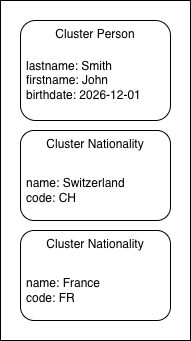
A Root Capture Base that contains only Reference attributes (referencing a nested Capture Base) is displayed as an individual cluster for each referenced attribute at the same top level. In case of attribute type Array[Reference], each Reference element in the array is displayed as an individual cluster at the same top level. Cluster headlines are taken from the label attribute mapping in the Label Overlay.
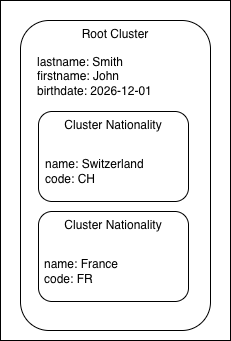
A Root Capture Base containing attributes of various types is displayed as a single cluster without a headline label. Referenced Capture Bases are displayed as nested clusters with the hierarchy level of their Capture Base.
Example Root Capture Base containing only attributes of type Reference
data source
{
    "firstname":"John",
    "lastname":"Smith",
    "birthdate":"2026-12-01",
    "nationalities":[
        {
            "name":"Switzerland",
            "code":"CH"
        },
        {
            "name":"France",
            "code":"FR"
        }
    ]
}
OCA Bundle
{
    "capture_bases": [
        {
            "type":"spec/capture_base/1.0",
            "digest":"IH9-zyhAKgrRijczp11n8p2y7il_1kHIhCVD4Bggp0wZ",
            "attributes":{
                "person":"refs:ICXjR6pKk86GPjLsVw3NMGiZRQJ7sQ-G7sUKexXXyvsW",
                "nationalities":"Array[refs:IKFPGHwRoHqEep0xTJD8k3lQGaN-7Ytg-NnaIDX6pBoe]"
            }
        },
        {
            "type":"spec/capture_base/1.0",
            "digest":"ICXjR6pKk86GPjLsVw3NMGiZRQJ7sQ-G7sUKexXXyvsW",
            "attributes":{
                "lastname":"Text",
                "firstname":"Text",
                "birthdate":"DateTime"
            }
        },
        {
            "type":"spec/capture_base/1.0",
            "digest":"IKFPGHwRoHqEep0xTJD8k3lQGaN-7Ytg-NnaIDX6pBoe",
            "attributes":{
                "name":"Text",
                "code":"Text"
            }
        }
    ]
}
Clustering
Example Root Capture Base containing attributes of various types
data source
"person":{
    "firstname":"John",
    "lastname":"Smith",
    "birthdate":"2026-12-01"
},
"nationalities":[
    {
        "name":"Switzerland",
        "code":"CH"
    },
    {
        "name":"France",
        "code":"FR"
    }
]
OCA Bundle
{
    "capture_bases":[
        {
            "type":"spec/capture_base/1.0",
            "digest":"IIQFN-3CMpBvSllFw8wpfiZ8Bl0F5IM2nkjDmrP2I5LA",
            "attributes":{
                "lastname":"Text",
                "firstname":"Text",
                "birthdate":"DateTime",
                "nationalities":"Array[refs:IKFPGHwRoHqEep0xTJD8k3lQGaN-7Ytg-NnaIDX6pBoe]"
            }
        },
        {
            "type":"spec/capture_base/1.0",
            "digest":"IKFPGHwRoHqEep0xTJD8k3lQGaN-7Ytg-NnaIDX6pBoe",
            "attributes":{
                "name":"Text",
                "code":"Text"
            }
        }
    ]
}
Clustering
OCA Bundle reference in Verifiable Credentials
For the OCA to be usable, it needs to be resolvable by the Wallet and referenced inside the VC.
SD-JWT VC
When an Issuer desires to specify OCA rendering instructions for a Verifiable Credential in the dc+sd-jwt format, they MUST add a render property to the Type Metadata, that uses the data model described below. This specification extends the SD-JWT VC Render Metadata with a new oca rendering method.
The oca rendering method is intended for use in applications that support OCA rendering. The object MUST contain the following properties:
uriA URI which is either a URL that points to an OCA Bundle file with an associatedapplication/jsonmedia type or a Data URL.
And MAY contain:
uri#integrityThe value MUST be an “integrity metadata” string as defined in Section 3 of W3C.SRI. If theuriis a Data URL, the “integrity metadata” string MUST be about the whole Data URL. A Consumer of the respective documents MUST verify the integrity of the retrieved document as defined in Section 3.3.5 of W3C.SRI.
Example SD-JWT VC rendering method
{
    "display": [
        {
            "rendering":{
                "oca":{
                    "uri":"https://example.com/example-vc/oca-bundle",
                    "uri#integrity":"sha256-9cLlJNXN-TsMk-PmKjZ5t0WRL5ca_xGgX3c1VLmXfh-WRL5"
                }
            }
        }
    ]
}
Limitations
- OCA Bundle MUST be a single JSON file
- Capture Bases and Overlays MUST be canonicalized with JCS (RFC8785) before generating a CESR digest.
- CESR digest MUST be encoded with SHA-256
Implementation Guide
Handling nested objects
The following example presents how nested object SHOULD be presented in the core OCA specification.
The extension of the Capture Base definition in chapter Capture Base Extension allows for multiple Capture Base in one file and gives the capability to define every aspect of a verifiable credential.
As per OCA core specification, Capture Base can be referenced by using the refs: prefix followed by the CESR digest of the additional Capture Base.
⚙️ Note:
A Capture Base structure does not have to exactly match the structure of it’s data source. For instance, a data source may have attributes in a flat hierarchy with no nested objects whereas the OCA Bundle defines multiple Capture Bases that group some of the data source attributes together.
The following example includes a nested data source object pets and an address Capture Base (mapping data source street, city and country) which gives the possibility to define visual properties of array items and cluster data source attributes.
data source
{
    "firstname":"John",
    "lastname":"Smith",
    "street":"Bundesplatz",
    "city":"Bern",
    "country":"Switzerland",
    "pets":[
        {
            "race":"Dog",
            "name":"Rex"
        },
        {
            "race":"Cat",
            "name":"Mr. Pineapple"
        }
    ]
}
OCA Bundle
{
    "capture_bases": [
        {
            "type": "spec/capture_base/1.0",
            "digest": "IAer8X5u59cI2kaJziETEggN_Yft6gsY5tiVutLm7tyM",
            "attributes": {
                "lastname": "Text",
                "firstname": "Text",
                "address": "refs:IAuwaTn6mftTX0kOy4BQQaBYH-1jVVG9_zeEQRCwz-i5",
                "pets": "Array[refs:IKLvtGx1NU0007DUTTmI_6Zw-hnGRFicZ5R4vAxg4j2j]"
            }
        },
        {
            "type": "spec/capture_base/1.0",
            "digest": "IKLvtGx1NU0007DUTTmI_6Zw-hnGRFicZ5R4vAxg4j2j",
            "attributes": {
                "name": "Text",
                "race": "Text"
            }
        },
        {
            "type": "spec/capture_base/1.0",
            "digest": "IAuwaTn6mftTX0kOy4BQQaBYH-1jVVG9_zeEQRCwz-i5",
            "attributes": {
                "street": "Text",
                "city": "Text",
                "country": "Text"
            }
        }
    ],
    "overlays": [
        {
            "type": "extend/overlays/data_source/2.0",
            "capture_base": "IAer8X5u59cI2kaJziETEggN_Yft6gsY5tiVutLm7tyM",
            "format": "dc+sd-jwt",
            "attribute_sources": {
                "lastname": ["lastname"],
                "firstname": ["firstname"],
                "pets": ["pets", null]
            }
        },
        {
            "type": "extend/overlays/data_source/2.0",
            "capture_base": "IAuwaTn6mftTX0kOy4BQQaBYH-1jVVG9_zeEQRCwz-i5",
            "format": "dc+sd-jwt",
            "attribute_sources": {
                "street": ["street"],
                "city": ["city"],
                "country": ["country"]
            }
        },
        {
            "type": "extend/overlays/data_source/2.0",
            "capture_base": "IKLvtGx1NU0007DUTTmI_6Zw-hnGRFicZ5R4vAxg4j2j",
            "format": "dc+sd-jwt",
            "attribute_sources": {
                "name": ["pets", null, "name"],
                "race": ["pets", null, "race"]
            }
        },
        {
            "type": "aries/overlays/branding/1.1",
            "capture_base": "IAer8X5u59cI2kaJziETEggN_Yft6gsY5tiVutLm7tyM",
            "language": "en",
            "theme": "light",
            "logo": "data:image/jpeg;base64,iVBORw0KGgoAAAANSUhEUgAAABoAAAAaCAYAAACpSkzOAAAACXBIWXMAAAsTAAALEwEAmpwYAAAAAXNSR0IArs4c6QAAAARnQU1BAACxjwv8YQUAAAGbSURBVHgBvVaBUcMwDFQ4BjAbmA06QjYgGzQbkA1aJmg3yHWCwgSGCVImcJkg3UDYjVMUI6VxW/g7X+701kuWZTsAI0DEwo0GO9RuKMKpYGvdsH4uXALnqPE3DOFrhs8hFc5pizxyN2YCZyS9+5FYuWCfgYzZJYFUon2UuwMZ+xG7xO3gXKBQ95xwGyHIuxuvbhwY/oPo+WbSQAyKtDCGVtWM3aMifmXENcGnb3uqp6Q2NZHgEpnWDQl5rsJwxgS9NTBZ98ghEdgdcA6t3yOpJQtGSIUVekHN+DwJWsfSWSGLmsm2xWHti2iOEbQav6I3IYtPIqDdZwvDc3K0OY5W5EvQ2vUb2jJZaBLIogxL5pUcf9LC7gzZQPigJXFe4HmsyPw1sRvk9jKsjj4Fc5yOOfFTyDcLcEGfMR0VpACnlUvC4j+C9FjFulkURLuPhdvgIcuy08UbPxMabofBjRMHOsAfIS6db21fOgXXYe/K9kgNgxWFmr7A9dhMmoXD001h8OcvSPpLWkIKsLu3THC2yBxG7B48S5IoJb1vHubbPPxs2qsAAAAASUVORK5CYII=",
            "primary_background_color": "#2C75E3",
            "primary_field": "{{firstname}} {{lastname}}"
        },
        {
            "type": "spec/overlays/meta/1.0",
            "capture_base": "IAer8X5u59cI2kaJziETEggN_Yft6gsY5tiVutLm7tyM",
            "language": "en",
            "name": "Pet Permit"
        },
        {
            "capture_base": "IAer8X5u59cI2kaJziETEggN_Yft6gsY5tiVutLm7tyM",
            "type": "extend/overlays/order/1.0",
            "attribute_orders": {
                "lastname": 2,
                "firstname": 1,
                "address": 3,
                "pets": 4
            }
        },
        {
            "capture_base": "IKLvtGx1NU0007DUTTmI_6Zw-hnGRFicZ5R4vAxg4j2j",
            "type": "extend/overlays/order/1.0",
            "attribute_orders": {
                "race": 1,
                "name": 2
            }
        },
        {
            "capture_base": "IAuwaTn6mftTX0kOy4BQQaBYH-1jVVG9_zeEQRCwz-i5",
            "type": "extend/overlays/order/1.0",
            "attribute_orders": {
                "street": 1,
                "city": 2,
                "country": 3
            }
        },
        {
            "capture_base": "IKLvtGx1NU0007DUTTmI_6Zw-hnGRFicZ5R4vAxg4j2j",
            "type": "spec/overlays/label/1.1",
            "language": "en",
            "attribute_labels": {
                "race": "Race",
                "name": "Name"
            }
        },
        {
            "capture_base": "IAer8X5u59cI2kaJziETEggN_Yft6gsY5tiVutLm7tyM",
            "type": "spec/overlays/label/1.1",
            "language": "en",
            "attribute_labels": {
                "firstname": "Firstname",
                "lastname": "Lastname",
                "address": "Address",
                "pets": "Pet {{refs:IKLvtGx1NU0007DUTTmI_6Zw-hnGRFicZ5R4vAxg4j2j:name}}"
            }
        },
        {
            "capture_base": "IAuwaTn6mftTX0kOy4BQQaBYH-1jVVG9_zeEQRCwz-i5",
            "type": "spec/overlays/label/1.1",
            "language": "en",
            "attribute_labels": {
                "street": "Street",
                "city": "City",
                "country": "Country"
            }
        }
    ]
}
Rendering Algorithm and Example
This chapter defines a rendering algorithm and an example with the data from chapter Handling nested objects.
The general rendering process follows this steps:
- Parse the Capture Base(s) and detect references between them and verify to not create a reference loop.
- Parse all Overlays.
- Use the Data Source Mapping Overlay to map between the input data source and the Capture Base attributes.
- Render the visuals with the remaining Overlays.
The rendering process depends on which view is rendered. Here are two rendering example for a VC preview and detail view.
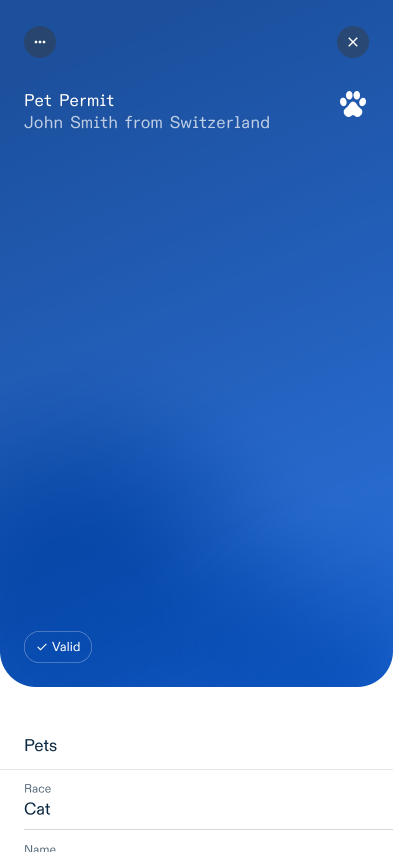
VC Preview rendering
- Search for the Branding Overlay and the Meta Overlay of the Root Capture Base
- Get the raw attribute data with the query in the Data Source Mapping Overlay
- Interpret the data types of the Capture Base attributes and search for additional context on how to visualize them in the Standard Overlay, Format Overlay, etc.
- Interpret the data into a preview view like the following example:
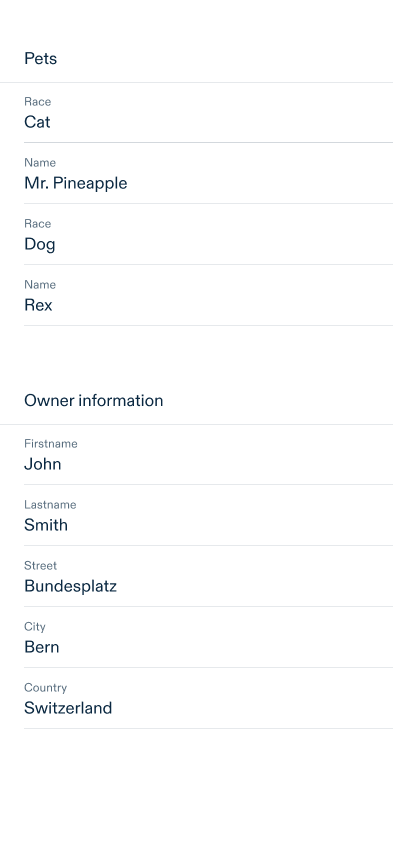
VC Detail rendering
Start with the Root Capture Base:
- Get the raw attribute data with the query in the Data Source Mapping Overlay
- Search for the Order Overlay of the Capture Base
- Iterate over the Capture Base attributes in the Order Overlay and search for additional context on how to visualize them in the Standard Overlay, Format Overlay, etc.
- If the attribute is NOT of type Reference, render them visually
- If the attribute is of type Reference, start again from 1. with the referenced Capture Base
Finally, interpret the data into a detail view like the following example:
CESR encoding
The OCA specification defines that the OCA file name and the digest inside the OCA bundle have to use the CESR encoding.
CESR is an encoding format for text and binary data that has the unique property of text-binary concatenation composability (for context: A popular encoding format for binary is Base64).
For those interested, the composable concatenation is described in detail in the CESR Specification. However, it is not necessary to understand how the encoding of digests works to proceed with this document.
CESR uses the Base64 transformation in it’s process to encode binaries but the composability property only works when no Base64 padding is used (when you have padding in Base64 you can not add two binaries together!).
To avoid Base64 padding, the smallest common denominator between the number of bits in a byte and the information stored in a Base64 character (6 bits of information in a byte) has to be used.
The smallest common denominator of 8 and 6 is 24, so the smallest CESR unit is 24 bits. The essential information here is that the number of bits used for binary text encoding with CESR has to be divisible by 8 and 6.
Each CESR encoding also includes metadata over the content of the data. In the digest case, it will start with a letter which defines which digest algorithm was used.
Generate CESR encoding flow with SHA-256
A SHA-256 digest has a size of 256 bits. It is divisible by 8 but not by 6. The next possible value would be 264 bits which are 33 bytes.
Hence, the CESR encoding will need 33 bytes to work which means that the SHA-256 hash needs a padding byte.
The CESR encoding flow works as described next and depicted in Fig. 1.:
- Add a leading padding byte to the binary digest. (result = lead byte + binary digest)
- Encode the result from step 1 in Base64 URL safe
- Remove the part of the Base64 encoded padding by removing character A (will remove 6 of the 8 lead padding bits)
- Add the CESR algorithm code in front of the result of step 3 (uppercase i => I for SHA-256 digest)
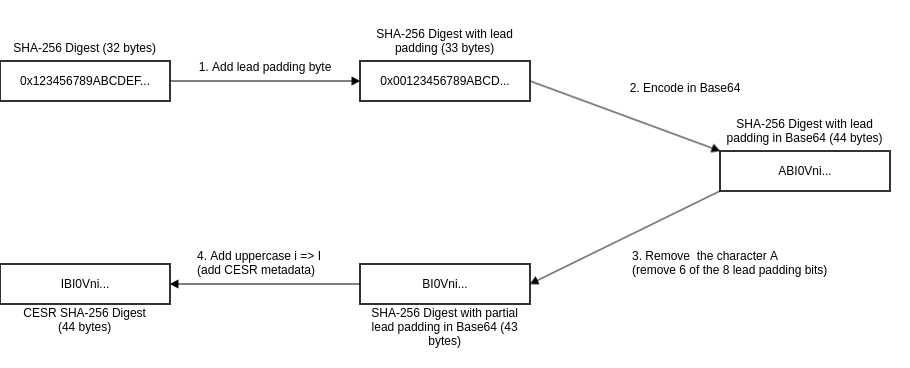
A CESR SHA-256 JavaScript implementation can be found in the appendix.
CESR hash creation example of an OCA Bundle
Pseudo code:
function calculateCesrDigest(payload):
    leading_byte = [0x00]

    # Step 0: Temporarily replace the digest field with a dummy string of the correct length
    payload.digest = "#".repeat(ALGORITHM_DIGEST_LENGTH)

    # Step 1: canonicalise payload
    canonicalised_payload = canonicalize(payload)

    # Step 2: Calculate the cryptographic digest of the modified payload
    digest = calculate_hash(canonicalised_payload, ALGORITHM)

    # Step 3: Prepend a 0x00 byte to the digest
    combined = concatenate(leading_byte, digest)

    # Step 4: Encode the result in URL-safe Base64 (no padding)
    base64_url = base64_url_safe_encode(combined)

    # Step 5: Replace the first character with the algorithm code and return
    digest = ALGORITHM_CODE + substring(base64_url, 1)
- Prepare the Capture Base and fill the
digestattribute with the diggest dummy defined by CESR (44 ‘#’ for the SHA-256 digest).{ "type":"spec/capture_base/1.0", "digest":"############################################", "attributes":{ "name":"Text" } } -
Canonicalise the payload, as the order of JSON properties cannot be guaranteed otherwise. JCS (RFC8785) sets a specification to canonicalise JSON.
-
Compute the CESR encoded SHA-256 digest with the pseudo code given above (step 2 to 5) and put the value into the
digestattribute. The output should match the following result:{ "type":"spec/capture_base/1.0", "digest":"IBYzBHEN4moeVO_aQtW_DbDoQd-30BgeJQMyfsRzoUFI", "attributes":{ "name":"Text" } } -
Add the Capture Base and Overlays to the JSON and fill the reference to the Capture Base in each Overlay.
{ "capture_bases":[ { "type":"spec/capture_base/1.0", "digest":"IBYzBHEN4moeVO_aQtW_DbDoQd-30BgeJQMyfsRzoUFI", "attributes":{ "name":"Text" } } ], "overlays":[ { "capture_base":"IBYzBHEN4moeVO_aQtW_DbDoQd-30BgeJQMyfsRzoUFI", "type":"spec/overlays/label/1.0", "language":"fr-CH", "attribute_labels":{ "name":"Nom" } } ] } - The core OCA specification computes a CESR encoded digest for each Overlay in the same way. This documentation skips the generation of the Overlay digests, as the additional digests add no value to a single file OCA Bundle.
After those steps the following content is generated:
{
"capture_bases":[
 {
     "type":"spec/capture_base/1.0",
     "digest":"IBYzBHEN4moeVO_aQtW_DbDoQd-30BgeJQMyfsRzoUFI",
     "attributes":{
         "name":"Text"
     }
 }
],
"overlays":[
{
"capture_base":"IBYzBHEN4moeVO_aQtW_DbDoQd-30BgeJQMyfsRzoUFI",
"type":"spec/overlays/label/1.0",
"language":"fr-CH",
"attribute_labels":{
"name":"Nom"
}
}
]
}
References
- Aries Branding Overlay
- CESR
- ISO8601
- OpenID4VCI credential format profiles
- Overlays Capture Architecture
- RFC2397
- RFC8785
- RFC9535
- SD-JWT VC
- W3C.SRI
Appendix
CESR SHA-256 Encoder
This appendix proposes an implementation to encode SHA-256 digest in the CESR format.
Warning:
The canonicalizition step is necessary, as the order of JSON properties can not be guaranteed otherwise. JCS (RFC8785) sets a specification to canonicalize JSON.
// Generate CESR encoded SHA-256 digest
// Code only works for digest with fixed length!
// see original function _infil() https://github.com/WebOfTrust/cesr-ts/tree/development/src/matter.ts#L387

const { Buffer } = require('node:buffer');
const crypto = require('node:crypto');
const canonicalize = require('canonicalize');

const data ={"data": "value"};
const canonicalizedData = canonicalize(data)
const raw = crypto.createHash('sha256').update(canonicalizedData).digest();
const padSize = (3 - (raw.length % 3)) % 3; // compute necessary lead size bytes. A SHA-256 digest's length will always be 32 which means that the padSize will be 1.

const code = "I" // SHA2_256 digest CESR metadata
const codeSize = code.length; // SHA2_256 digest CESR metadata

// prepad the SHA-256 digest
const bytes = new Uint8Array(padSize + raw.length);
for (let i = 0; i < padSize; i++) {
    bytes[i] = 0;
}
for (let i = 0; i < raw.length; i++) {
    const odx = i + padSize;
    bytes[odx] = raw[i];
}

// Transform padded SHA-256 bytes to Base64, Remove character 'A' (6 out of the 8 padding bits) and add CESR metadata code in front
console.log(
    code +
    Buffer.from(bytes)
        .toString('base64url')
        .slice(codeSize % 4)
);