Designing the visualisation for Issuer, Verifier and Credential
Sandbox
The underlying specification and the new Swiss Profiles are currently under revision and are subject to change.
The outdated version of this cookbook has been archived.
Last edited: 2026-08-12
Introduction
This manual describes how to define the visual presentation of a Verifiable Credential (VC) displayed in the swiyu Wallet, the digital wallet app of the Swiss Confederation.
Its goal is to enable issuers in creating clean, professional looking credentials that effectively represent their organisation or service. This guide provides all necessary information to prepare from the start the appropriate graphic assets and determine the suitable settings.
The instruction is based on the credential visualisation with OID Credential Issuer Metadata and Overlays Capture Architecture (OCA), which are defined in the Swiss Profile.
Purpose and Overview
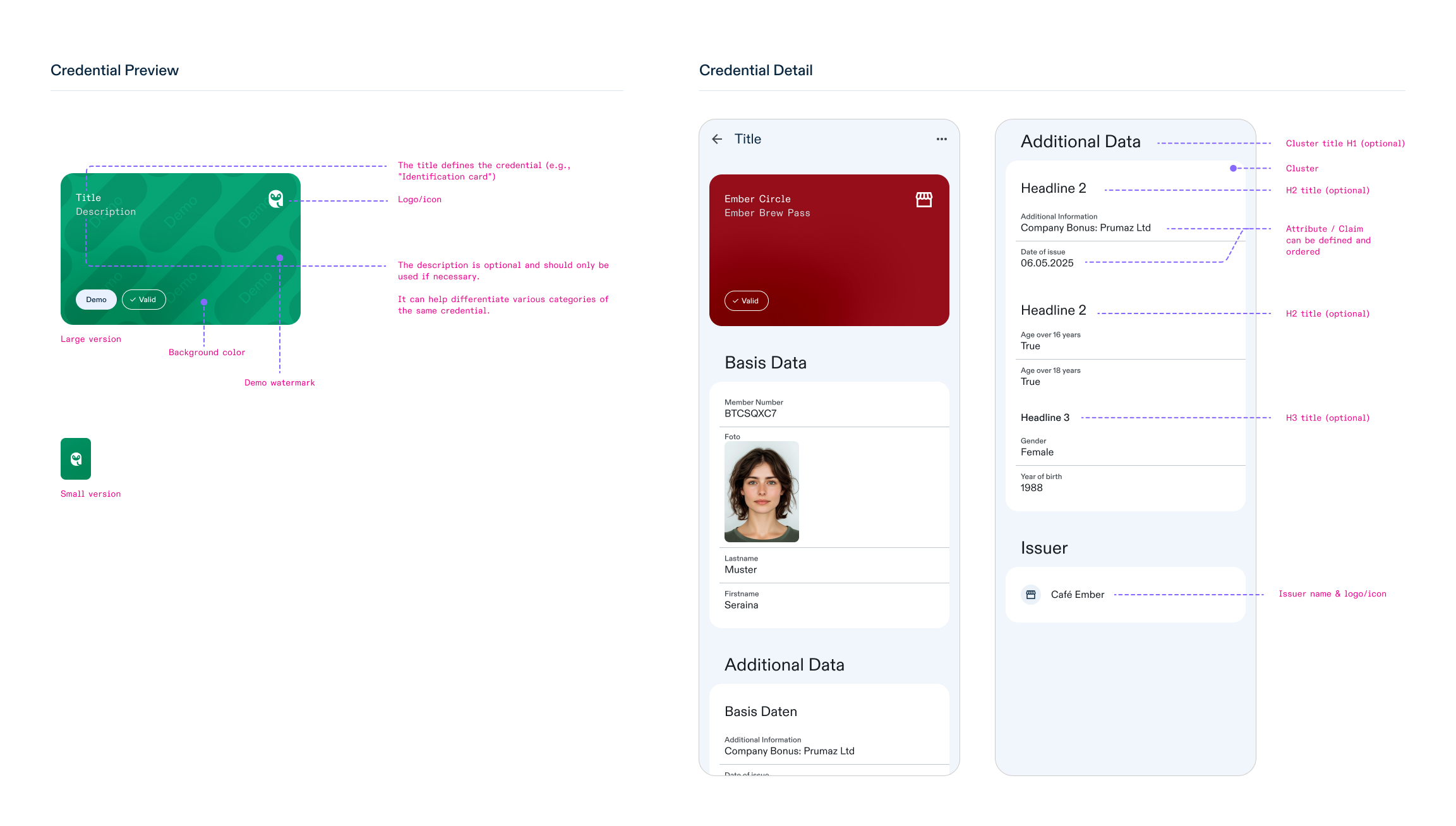
In the swiyu Wallet, Verifiable Credentials (VC) are visually represented as cards to allow users to easily recognise and utilise them. According to the implemented credential visualisation metadata, an issuer/verifier can define the following:
- the verifier’s or issuer’s name and logo
- the background colour of the credential
- the logo of the credential
- the name of the credential
- the displayed complementary info of the credential (description)
- the name and value appearance of credential attributes (claims)
- the clustering and ordering of the credential attributes
All these visible or readable features are set and configured by the issuer/verifier in it’s Credential Issuer Metadata and/or OCA Bundle.
Below is an example of how various credentials are displayed in different situations in the swiyu Wallet.
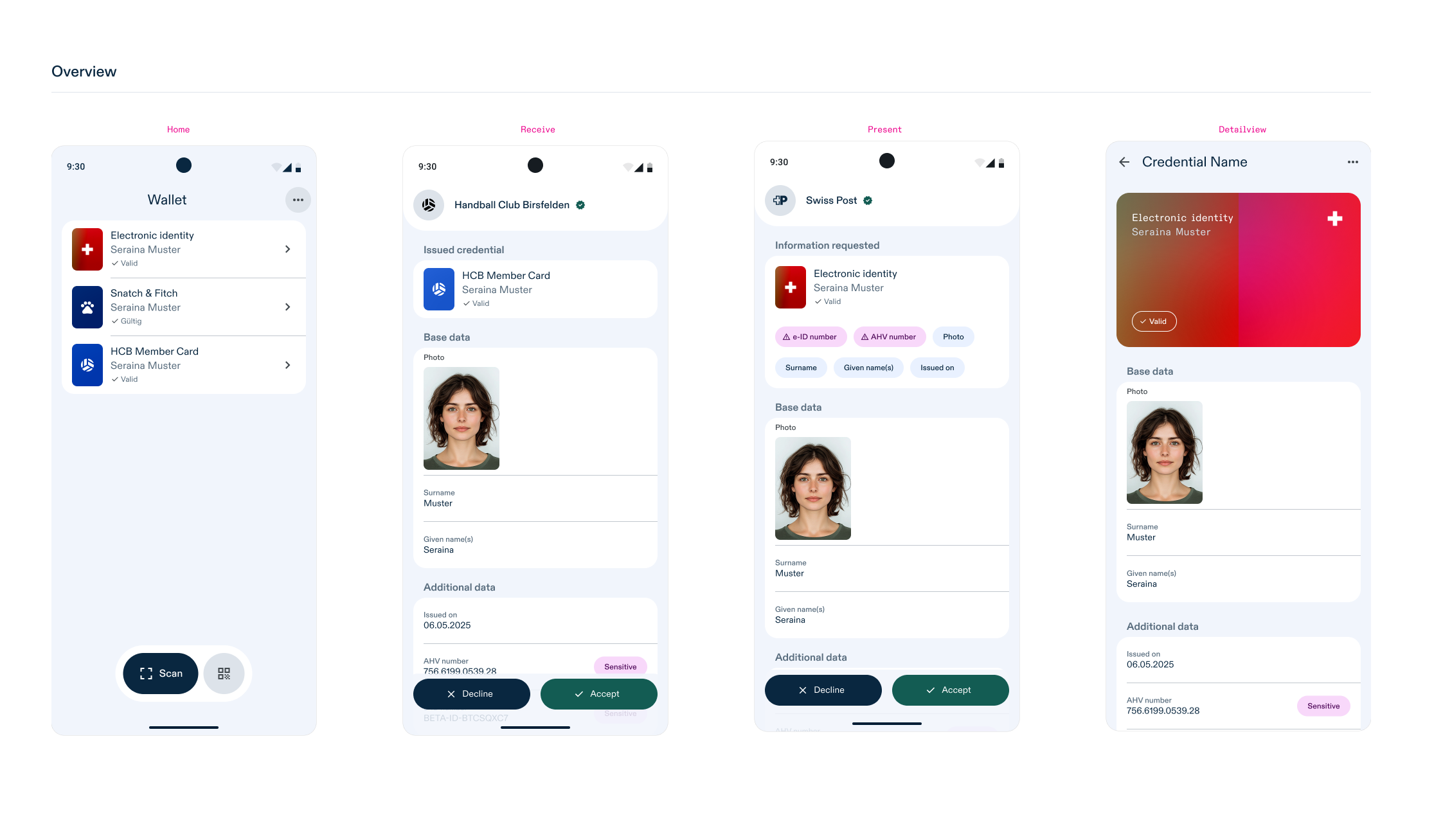
As an example, the visualisation metadata in OID4VCI and OID4VP with focus on only the relevant fields (technical fields are hidden) look like this:
credential_issuer_metadata.json: |
{
  "display": [
    {
      "name": "Issuer title",
      "locale": "en",
      "logo": {
        "uri": "data:image/png;base64,<...base64code....>"
      }
    }
  ],
  "credential_configurations_supported": {
    "demo-credential": {
      "credential_metadata": {
        "display": [
          {
            "name": "Title of credential",
            "locale": "en",
            "logo": {
              "uri": "data:image/png;base64,<...base64code....>"
            },
            "description": "Demo purpose",
            "background_color": "#FF5733"
          }
        ],
        "claims": [
          {
            "path": ["family_name"],
            "display": [
              {
                "name": "Lastname",
                "locale": "en"
              }
            ]
          },
          {
            "path": ["given_name"],
            "display": [
              {
                "name": "Firstname",
                "locale": "en"
              }
            ]
          }
        ]
      }
    }
  }
}
oca_bundle.json: |
{
  "capture_bases": [
    {
      "type": "spec/capture_base/1.0",
      "digest": "abc-123",
      "attributes": {
        "given_name": "Text",
        "family_name": "Text"
      }
    }
  ],
  "overlays": [
    {
      "type": "spec/overlays/meta/1.0",
      "capture_base": "abc-123",
      "language": "en",
      "name": "Title of credential",
      "description": "Demo purpose"
    },
    {
      "type": "spec/overlays/label/1.1",
      "capture_base": "abc-123",
      "language": "en",
      "attribute_labels": {
        "given_name": "Firstname",
        "family_name": "Lastname"
      }
    },
    {
      "type": "aries/overlays/branding/1.1",
      "capture_base": "abc-123",
      "language": "en",
      "theme": "light",
      "logo": "data:image/png;base64,<...base64code....>",
      "primary_background_color": "#FF5733",
      "primary_field": "Demo purpose for {{given_name}} {{family_name}}"
    }
  ]
}
verification_authorization_request.json: |
{
  "client_metadata": {
    "client_name": "Reference Demo Verifier",
    "logo_uri": "data:image/png;base64,<...base64code....>",
  }
}
Multilanguage
The swiyu Wallet supports the following languages: DE, FR, IT, RM, EN. If none of the languages supported by the app are declared in the visualisation metadata, the app selects a suitable default locale based on the device settings and the general range of locales declared in the visualisation metadata.
credential_issuer_metadata.json: |

"locale": "en-GB"
oca_bundle.json: |

"language": "en-GB"
verification_authorization_request.json: |
{
  "client_name#en-GB": "Reference Demo Verifier",
  "client_name": "Reference Demo Verifier (Base)",
  "logo_uri#en-GB": "data:image/png;base64,<...base64code....>",
  "logo_uri": "data:image/png;base64,<...base64code....>"
}
Good to know:
Definition per Language (Localisation) Background colour, logos, name and description can be set per language.
Locale region Be aware that the app preferred language selection mechanism tries to exactly match the locale. A language with additional region information like “de-CH” will not be the same language as just “de”.
It is recommended to always use region information when declaring visualisation metadata.
Background Color
credential_issuer_metadata.json: |
{
  "credential_configurations_supported": {
    "demo-credential": {
      "credential_metadata": {
        "display": [
          {
            "background_color": "#FF5733"
          }
        ]
      }
    }
  }
}
oca_bundle.json: |
{
  "overlays": [
    {
      "type": "aries/overlays/branding/1.1",
      "primary_background_color": "#FF5733"
    }
  ]
}
The background color is a solid HEX color value (e.g., #FFFFFF, #000000, #FF5733, etc.)
Background images are not supported.
No transparency/alpha channels are supported.
Good to know:
Readability
To ensure proper contrast and legibility of the information displayed on the card (such as the VC name, description, and logo/icon), a gradient overlay is applied. This helps text and icons stand out clearly against the chosen background colour, improving readability and overall user experience.
Furthermore, the swiyu Wallet will automatically adjust the colour of the text and the logo to black or white, depending on the brightness or darkness of the defined colour.
Darkmode
Although the swiyu Wallet supports dark mode, the VC’s color scheme remains unaffected by this setting. Consequently, its background color stays the same in both light and dark modes.
Demo-Watermark
All the credentials which are issued within the swiyu Sandbox Wallet are applied with a DEMO watermark to differentiate those credentials to the productive ones.
Logo/Icon for Issuer, Verifier & Credential
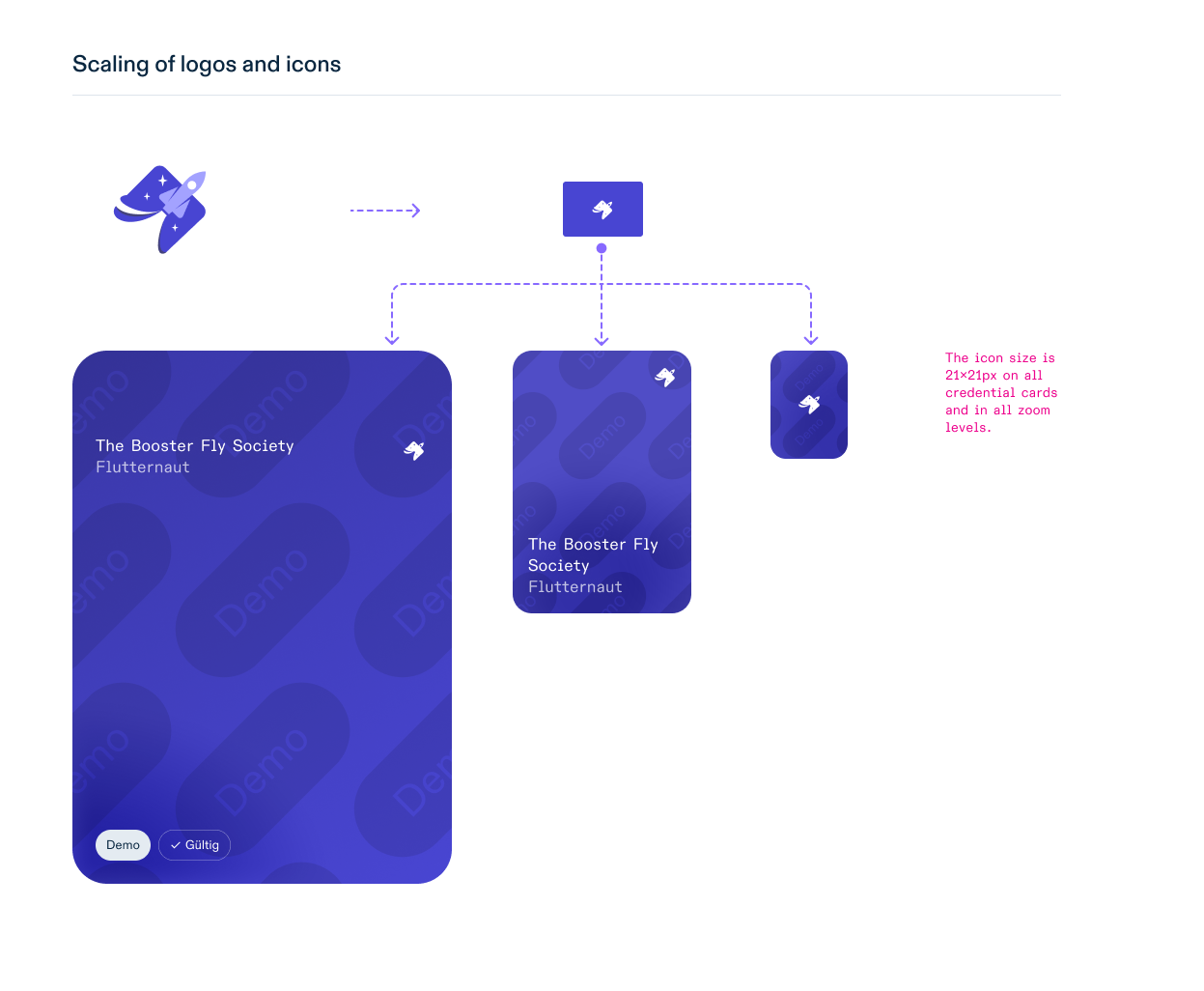
The logo or icon dimensions must not exceed 512×512 pixels and will be displayed at 24×24 pixels at any zoom level.
The logo or icon must be a transparent PNG (excluding the background).
No alpha channels or transparency for solid elements.
The Logo must be provided as image Data-URI, https URL are not supported.
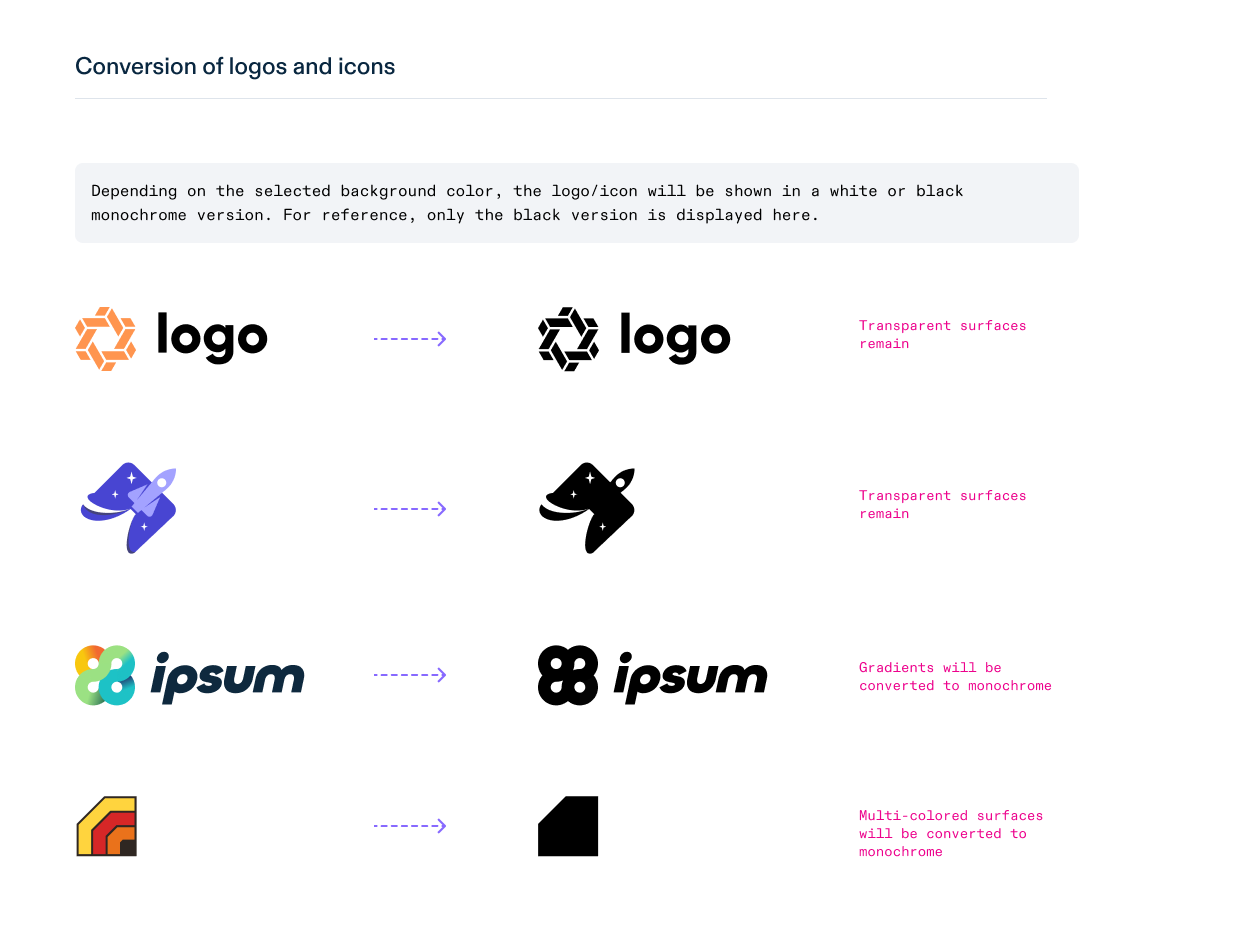
Multi-colored logos and gradients are automatically converted to a monochrome version to foster readability and ease of use.
The swiyu Wallet will automatically tint the logo to black or white, depending on the brightness or darkness of the background colour.
Good to know:
Downscaling
The logo/icon is automatically scaled down to a maximum size of 24×24 px. Extreme landscape or portrait logos/icons will be scaled such that the longest side is reduced to 24 px.
Recommendation:
- Use a square format whenever possible so it scales evenly across various layouts.
- Work with simplified icons/logos so they are readable even when small.
Plurilingualism
The VC supports multilingual visualisation metadata. This means the logo/icon can be defined per language.
Credential Logo
The credential’s logo is shown in any screen the credential is displayed.
credential_issuer_metadata.json: |
{
  "credential_configurations_supported": {
    "demo-credential": {
      "credential_metadata": {
        "display": [
          {
            "logo": {
              "uri": "data:image/png;base64,<...base64code....>"
            }
          }
        ]
      }
    }
  }
}
oca_bundle.json: |
{
  "overlays": [
    {
      "type": "aries/overlays/branding/1.1",
      "logo": "data:image/png;base64,<...base64code....>"
    }
  ]
}
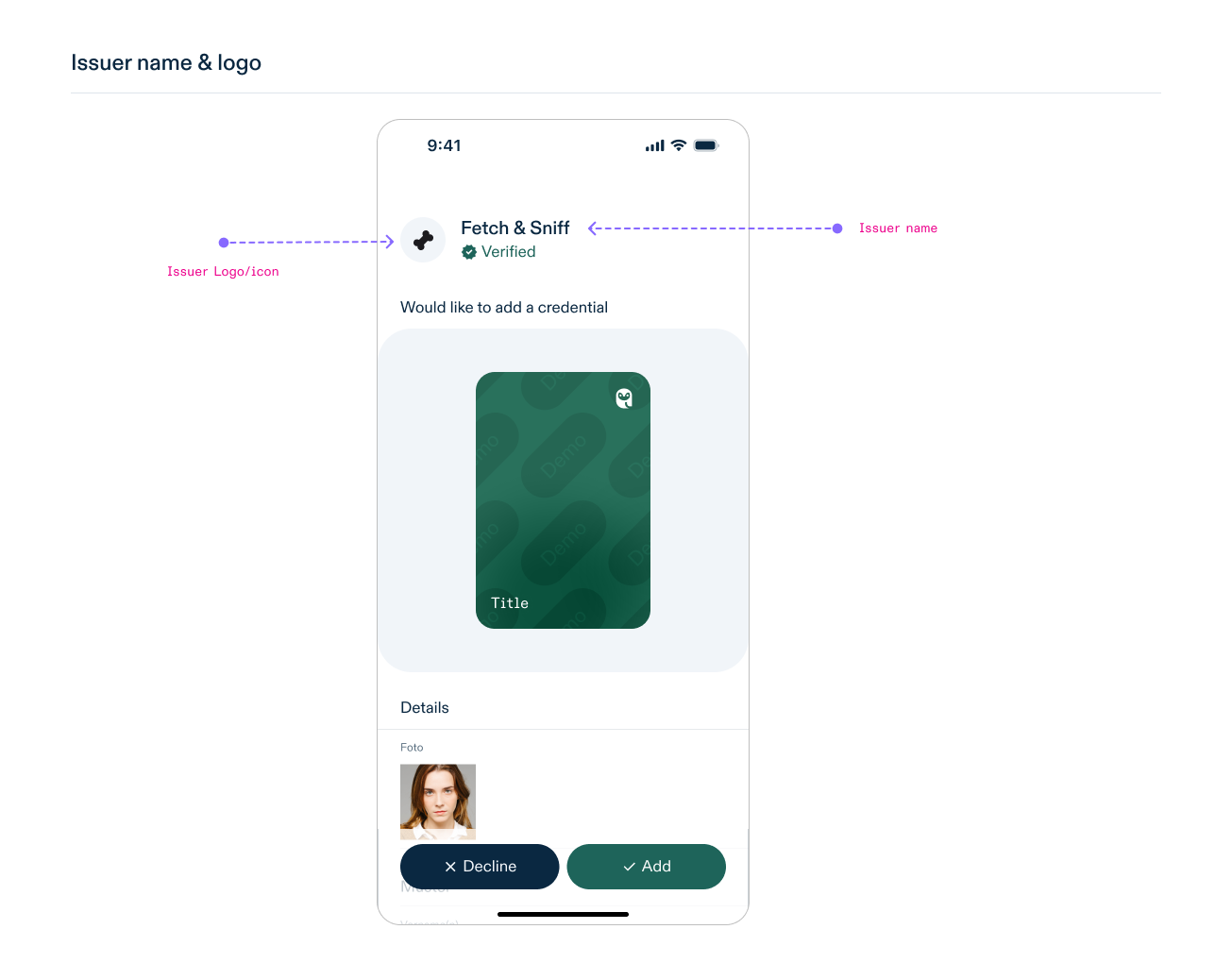
Issuer Logo
The issuer’s logo is part of the OID Credential Issuer Metadata and will be used for the credential offer screen and in the detail view of the credential.
credential_issuer_metadata.json: |
{
  "display": [
    {
      "logo": {
        "uri": "data:image/png;base64,<...base64code....>"
      }
    }
  ]
}
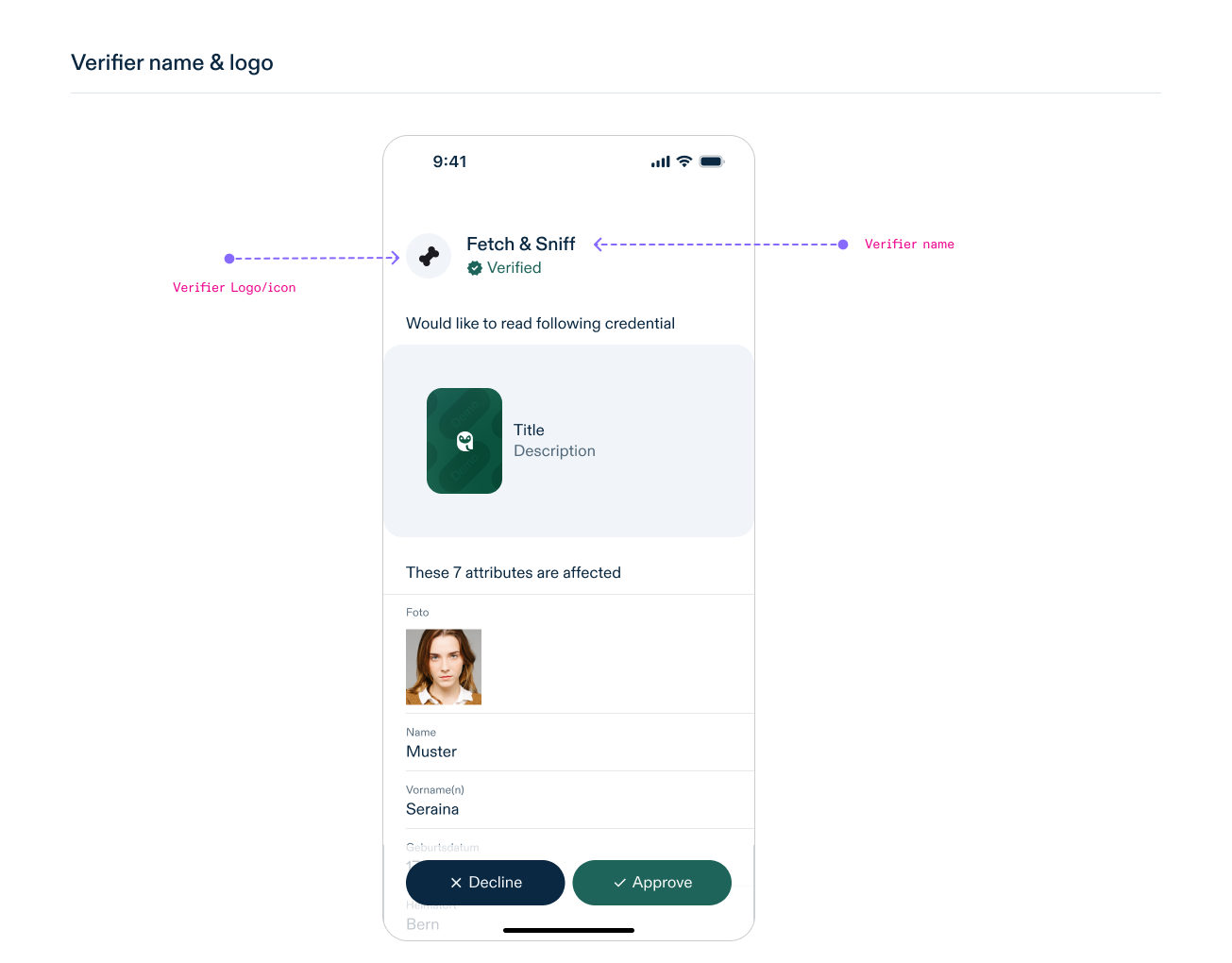
Verifier Logo
The verifier’s logo is only part of the OID4VP Authorization Request and will be used in the VC presentation screen.
verification_authorization_request.json: |
{
  "client_metadata": {
    "logo_uri": "data:image/png;base64,<...base64code....>",
  }
}
Name
Care to use a self-explanatory credential name that is of reasonable length.
Think to set the various language versions of it, so that name is displayed in the app language of the user.
Recommendation:
If you issue a family of diverse credentials (like e.g. entry pass spa, entry pass fitness & spa) try to integrate the difference already in the name and/or the color so that it is easier for a user to distinguish them.

Credential Name
The credential’s name will be used for the credential offer screen, credential preview and in the detail view of the credential.
credential_issuer_metadata.json: |
{
  "credential_configurations_supported": {
    "demo-credential": {
      "credential_metadata": {
        "display": [
          {
            "name": "Title of credential",
          }
        ]
      }
    }
  }
}
oca_bundle.json: |
{
  "overlays": [
    {
      "type": "spec/overlays/meta/1.0",
      "name": "Title of credential"
    }
  ]
}
Attribute Name
Each credential’s attribute can be named. This avoids that the technical name like given_name is displayed for an attribute.
credential_issuer_metadata.json: |
{
  "credential_configurations_supported": {
    "demo-credential": {
      "credential_metadata": {
        "claims": [
          {
            "path": ["family_name"],
            "display": [
              {
                "name": "Lastname",
                "locale": "en"
              }
            ]
          },
          {
            "path": ["given_name"],
            "display": [
              {
                "name": "Firstname",
                "locale": "en"
              }
            ]
          }
        ]
      }
    }
  }
}
oca_bundle.json: |
{
  "overlays": [
    {
      "type": "spec/overlays/label/1.1",
      "language": "en",
      "attribute_labels": {
        "given_name": "Firstname",
        "family_name": "Lastname"
      }
    }
  ]
}
Good to know:
Templating support
The Label Overlay supports templating. The placeholders in double brackets get replaced by the attribute value of the credential. This is especially useful for cluster headlines or object attributes in lists.
Issuer Name
The issuer’s name is only part of the OID Credential Issuer Metadata and will be used for the credential offer screen and in the detail view of the credential.
credential_issuer_metadata.json: |
{
  "display": [
    {
      "name": "Issuer title"
    }
  ]
}
Verifier Name
The verifier’s name is only part of the OID4VP Authorization Request and will be used in the presentation request screen.
verification_authorization_request.json: |
{
  "client_metadata": {
    "client_name": "Verifier title"
  }
}
Description
Carefully chose which metadata should come as complementary information on the credential preview right under the credential’s name.
Keep metadata concise and relevant to avoid overwhelming the user with unnecessary information.
credential_issuer_metadata.json: |
{
  "credential_configurations_supported": {
    "demo-credential": {
      "credential_metadata": {
        "display": [
          {
            "description": "Demo purpose"
          }
        ]
      }
    }
  }
}
oca_bundle.json: |
{
  "overlays": [
    {
      "type": "spec/overlays/meta/1.0",
      "description": "Demo purpose"
    },
    {
      "type": "aries/overlays/branding/1.1",
      "primary_field": "Demo purpose for {{given_name}} {{family_name}}"
    }
  ]
}
With an OCA Bundle, the description is taken in first priority from the Branding Overlay and if not declared, the description is used from the Meta Overlay.
Recommendation:
Templating support
The Branding Overlay’s primary_field supports templating. The placeholders in double brackets get replaced by the attribute value of the credential.
Order of Attributes
The display-order of attributes for a credential will be applied in the credential offer screen, in the detail view of the credential and in the credential presentation screen (verification).

credential_issuer_metadata.json: |
{
  "credential_configurations_supported": {
    "demo-credential": {
        "claims": [
          {
            "path": ["family_name"]
          },
          {
            "path": ["given_name"]
          },
		  {
            "path": ["social_security_number"]
          },
 		  {
            "path": ["over_16"]
          },
  		  {
            "path": ["over_18"]
          },
  		  {
            "path": ["birth_year"]
          }
        ]
      }
    }
  }
}
The order of claims description objects in the claims array is used to determine the order in which the attributes are displayed to the user.
oca_bundle.json: |
{
  "overlays": [
    {
      "type": "extend/overlays/order/1.0",
      "attribute_orders": {
        "given_name": 2,
        "family_name": 1,
		"social_security_number": 3,
 		"over_18": 5,
 		"over_16": 4,
 		"birth_year": 6
      }
    }
  ]
}
The order of attributes displayed to the user is determined by the attribute order number ascending.
Good to know:
Unknown order
If an attribute is not defined with a specific order, it is placed after the last known attribute order.
Sensitive Attributes
Sensitive attributes can be marked as such, indicating attributes that require protection against unauthorized or unwarranted disclosure. A visual indicator is displayed for these attributes.

oca_bundle.json: |
{
  "overlays": [
    {
      "type": "spec/overlays/sensitive/1.0",
      "attributes": ["family_name", "given_name"]
    }
  ]
}
Sensitive attributes can only be defined within an OCA Bundle by declaring a Sensitive Overlay.
Good to know
Sensitive Data
The Sensitive Overlay does just flag attributes as sensitive with a visual indicator. No further protection or privacy mechanism is applied by the swiyu Wallet based on these information. It’s up to the credential issuer to preserve user’s privacy.
Clustering of Attributes
Clustering enables you to organise credential attributes into groups. Within each cluster, three headlines (H1, H2 and H3) can be used to organise and categorise the credential attributes, making them easier for users to scan. Headline 1 for the cluster itself is optional, as are all other headlines.

Clustering can only be defined within an OCA Bundle by declaring Capture Bases. Headlines are taken from the respective OCA Label Overlay.
As an example, the below OCA Bundle defines two clusters, “base” and “additional”, with each a H1 headline “Basis Data” and “Additional data”. Cluster “base” contains the attributes “given_name”, “family_name” and each nationality as a sub-cluster H2 with headline from attribute “country”. Cluster “additional” contains attributes “birthday”, “over_18” and the subcluster “address” with H2 headline “Address”. Further, subcluster “address” contains itself again a subcluster “billaddress” with H3 headline “Billing address”.
credential.json: |
{
  "given_name": "Seraina",
  "family_name": "Muster",
  "birth_year": "1988",
  "over_18": true,
  "nationalities": [
    {
      "country": "Switzerland",
      "code": "CH"
    },
    {
      "country": "France",
      "code": "FR"
    }
  ],
  "address": {
    "city": "Berne"
  },
  "billing_address": {
    "city": "Lausanne"
  }
}
oca_bundle.json: |
{
  "capture_bases": [
    {
      "type": "spec/capture_base/1.0",
      "digest": "root",
      "attributes": {
        "basis": "refs:base",
        "additional": "refs:additional"
      }
    },
    {
      "type": "spec/capture_base/1.0",
      "digest": "base",
      "attributes": {
        "given_name": "Text",
        "family_name": "Text",
        "nationalities": "Array[refs:nat]"
      }
    },
    {
      "type": "spec/capture_base/1.0",
      "digest": "additional",
      "attributes": {
        "birth_year": "DateTime",
        "over_18": "Boolean",
		"address": "refs:address"
      }
    },
    {
      "type": "spec/capture_base/1.0",
      "digest": "nat",
      "attributes": {
        "country": "Text",
        "code": "Text"
      }
    },
    {
      "type": "spec/capture_base/1.0",
      "digest": "address",
      "attributes": {
        "city": "Text",
		"billing_address": "refs:billaddress"
      }
    },
     {
      "type": "spec/capture_base/1.0",
      "digest": "billaddress",
      "attributes": {
        "city": "Text"
      }
    }
  ],
  "overlays": [
    {
      "capture_base": "root",
      "type": "spec/overlays/label/1.1",
      "attribute_labels": {
        "basis": "Basis Data",
        "additional": "Additional data"
      }
    },
    {
      "capture_base": "base",
      "type": "spec/overlays/label/1.1",
      "attribute_labels": {
        "given_name": "Firstname",
        "family_name": "Lastname",
        "nationalities": "{{refs:nat:country}}"
      }
    },
    {
      "capture_base": "additional",
      "type": "spec/overlays/label/1.1",
      "attribute_labels": {
        "birth_year": "Year of birth",
        "over_18": "Age over 18 years",
        "address": "Address"
      }
    },
    {
      "capture_base": "nat",
      "type": "spec/overlays/label/1.1",
      "attribute_labels": {
        "country": "Country",
        "code": "Code"
      }
    },
    {
      "capture_base": "address",
      "type": "spec/overlays/label/1.1",
      "attribute_labels": {
        "city": "City",
        "billing_address": "Billing address"
      }
    },
    {
      "capture_base": "billaddress",
      "type": "spec/overlays/label/1.1",
      "attribute_labels": {
        "city": "City"
      }
    }
  ]
}
Good to know:
Default clustering
For Credential Issuer Metadata, a single cluster is displayed without a headline. This is the same as for an OCA Bundle, which declares a single Capture Base containing attributes not only of type Reference.
Single cluster with headline
A single cluster with a given headline is created by declaring a root Capture Base that contains a single Reference attribute pointing to another Capture Base that holds the attributes of this cluster. The H1 headline is taken from the Label Overlay corresponding to the root Capture Base.
Subclusters and headlines H2-H3
Clusters can be nested. For example, a Capture Base “CB1” may contain an attribute of type Reference to another Capture Base “CB2”. The cluster “CB2” is then a subcluster of the cluster “CB1” with the headline “H2”. The swiyu Wallet will display up to three levels; any further nested clusters will be displayed as if they were on level three.
Array object clusters
For array of objects, in a Capture Base with an attribute of type Array[Reference], each object in the array is displayed as an individual cluster with the hierarchy level of it’s Capture Base.
Data Types
The swiyu Wallet visualises attribute values according to their data type.
For Credential Issuer Metadata, the data type of an attribute is determined by the value type of the attribute’s JSON field.
In an OCA Bundle, the data type for an attribute is declared in the Capture Base within the attributes key-value pairs where the key is the attribute name and the value is the attribute type.
oca_bundle.json: |
{
  "capture_bases": [
    {
      "type": "spec/capture_base/1.0",
      "digest": "abc-123",
      "attributes": {
        "family_name": "Text"
      }
    }
  ]
}
The swiyu Wallet displays the various data type as following:
| Data Type | Credential Issuer Metadata (JSON value_type) | OCA Bundle | Sample Attribute Value | Displayed Value | Localizable Display | Comment |
|---|---|---|---|---|---|---|
| string | string | Text | "a value 1234" | a value 1234 | no[1] | Is displayed the same as input. |
| boolean | boolean | Boolean | true | true | no[1] | |
| integer | number | Numeric | 1000 | 1'000 | yes[1] | OCA with grouping separator |
| float/double | number | Numeric | 1234.56 | 1,234.56 | yes[1] | OCA with grouping separator |
| date | string[2] or number[2] | DateTime | 2007-04-05T14:30:40Z | 05.04.2007, 16:30:40 | yes[1] | Date formats ISO8601 or Unix Epoch Time are supported. OCA display of dates depends on the precision of the input date & time and on the platform specific formatting. Date format is declared in Standard Overlay for the attribute. |
| images | string[2] | Binary | <base64code> | <image> | no | Base64 encoded image binary data. OCA requires the attribute to be declared as base64 in CharacterEncoding Overlay and the image media type in Format Overlay. Media types image/png and image/jpeg are supported. |
| images | string[2] | Text | data:image/png;base64,<base64code> | <image> | no | Data URL images. OCA requires Standard Overlay to match Data URL from "Text" type attributes. |
| object | object | Reference | {"attribute": "value"} | yes | Data is a JSON object containing attributes of one of the supported data type. | |
| array | array | Array[] | ["a", "b", "c"] | a,b,c | yes | Data is a JSON array containing values of one of the supported data type. |
[1] Can be mapped to a localized string with OCA Entry & Entry Code Overlay
[2] The data value is matched to the respective data type
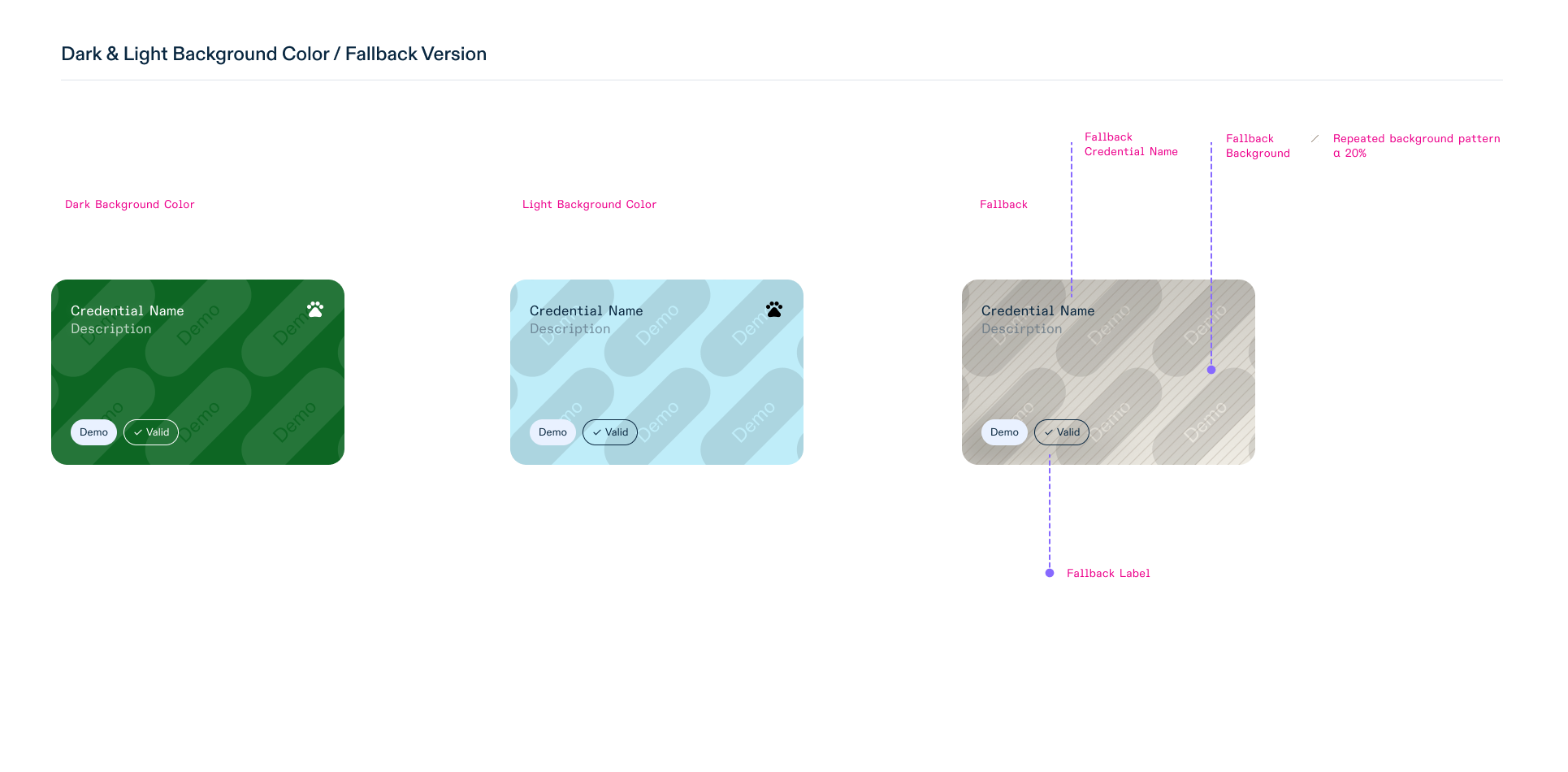
Fallback Visualisation
If an OCA Bundle is present and valid, it takes priority over the Credential Issuer Metadata. If neither is declared, a fallback visualisation takes place. There is no mix of visualisation information between OCA Bundle and Credential Issuer Metadata, either one or the other is applied.
Similarly, generally missing visualisation information is covered by an adequate fallback.
For missing assets like background colour and logos, a standard visual presentation is used.
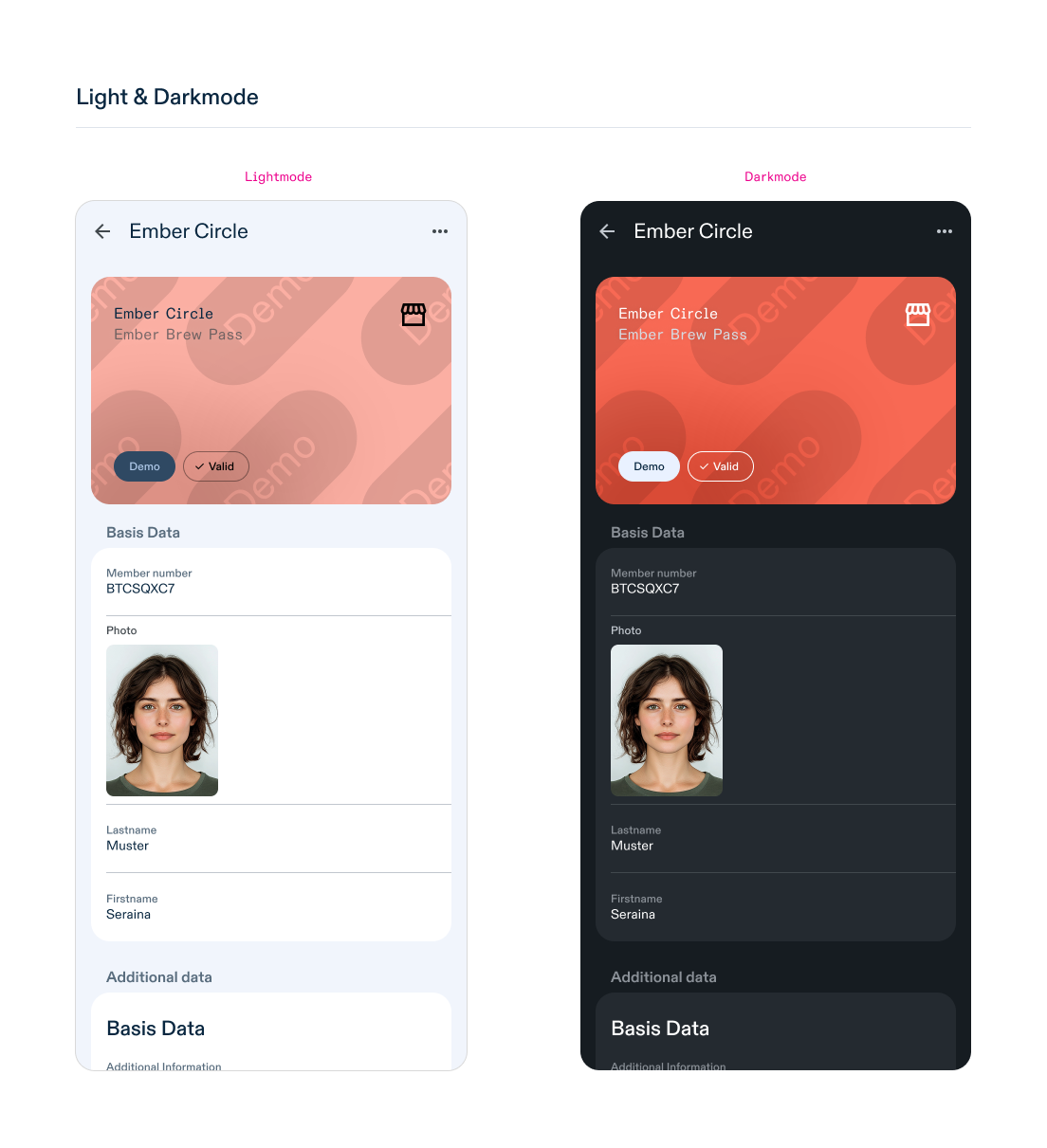
Theming
With an OCA Bundle, the appearance of a credential can be themed. This allows you to declare a background colour, credential logo and description, depending on whether the swiyu Wallet is in dark or light mode.
The Branding Overlay supports the theme property. If a Branding Overlay is declared with “dark” theme, the visualisation information is only considered when the swiyu Wallet is in dark mode. Any other theme is considered to be used in light mode.
oca_bundle.json: |
{
  "overlays": [
    {
      "type": "aries/overlays/branding/1.1",
      "theme": "dark"
    }
  ]
}
General questions
What happens if I upload a multi-colored logo? The logo is automatically converted to a single-color (monochrome) version. It is not possible to preserve color nuances.
Can I use an SVG for the logo? Only PNG and JPEG files are currently supported. SVG or other vector formats are not accepted.
Can I submit a logo larger than 512×512 pixels? For the swiyu Wallet, no. The maximum supported size for logos/icons is 512×512 pixels. If the logo exceeds this size, it will be automatically resized.
Can I use different background and logo colors for different languages? Yes. The system supports localization. You can define a background color and a logo/icon for each language.
Can I use an image instead of a background color? No. To ensure contrast and legibility, images are not supported.
Further assistance
Thank you for following these guidelines. By doing so, you help to ensure that your credentials are displayed correctly in the swiyu Wallet and are easily recognisable to users. If you have any questions or require further assistance, please feel free to open an issue in this GitHub repository.